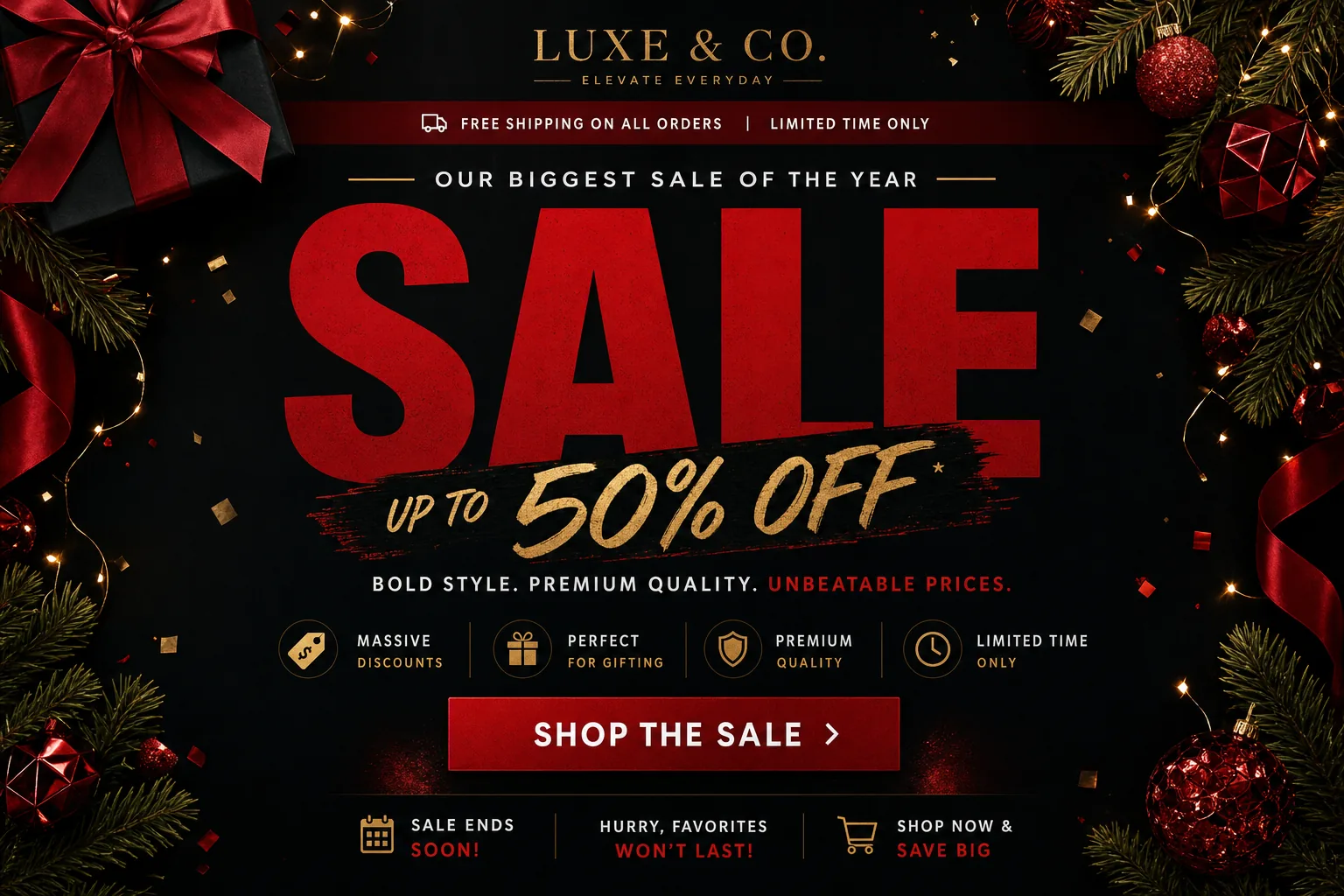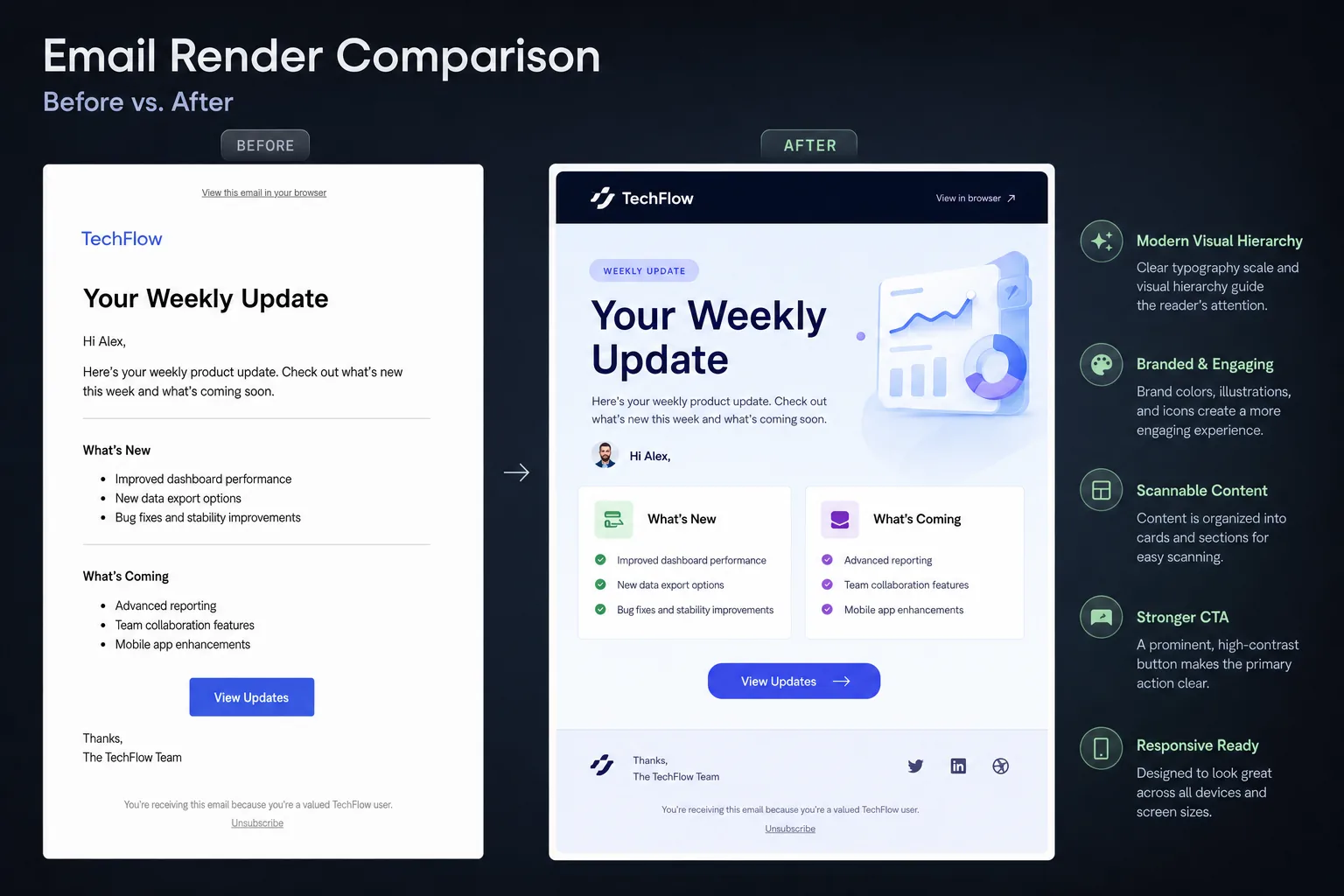
Email Marketing & Email Design Guides

Practical guides to email marketing, newsletter strategy, and email design. Explore examples and ideas for creating better email campaigns with JQRD.

  • Fixing Common Outlook Email Rendering Issues: A Practical Troubleshooting Guide for Email Marketers and Designers

    Fixing Common Outlook Email Rendering Issues: A Practical Troubleshooting Guide for Email Marketers and Designers

    Outlook email rendering is one of the most persistent sources of production surprises for email marketers, CRM teams, lifecycle marketers, and email designers. A campaign can look polished in a browser preview, pass a quick mobile check, and still arrive in Outlook with oversized images, unexpected gaps, inconsistent fonts, or dark mode colors that undermine readability.

    The challenge is not that Outlook is one client. It is a family of rendering environments. Desktop Outlook for Windows has historically used Microsoft Word as its rendering engine, which means it handles HTML and CSS differently from browser-based clients. Outlook.com, newer Outlook experiences, and mobile Outlook apps behave differently again. A fix that works in webmail may not resolve a desktop Outlook issue, and a layout that survives desktop Outlook may still need refinement for dark mode or responsive behavior elsewhere.

    See also: birthday email examples

    For production teams, the goal is not to make every client render identically. The goal is to make every version usable, readable, on-brand enough, and conversion-ready. Start with the most visible failures, isolate the likely cause, then apply conservative HTML email techniques that are known to hold up in Outlook.

    Why Outlook rendering breaks differently from other email clients

    Most Outlook issues come from a mismatch between modern email design expectations and the rendering rules used by different Outlook environments. Designers often build with responsive layouts, CSS-based spacing, background colors, web fonts, rounded buttons, and carefully balanced image-to-text compositions. Desktop Outlook may ignore or reinterpret parts of that code, especially when it depends on CSS properties that work reliably in browser-like clients.

    The most important distinction is between Word-based desktop Outlook and browser-based Outlook environments. Word-based rendering is less tolerant of modern CSS. It can treat margins unpredictably, add gaps around images, struggle with background images, alter line-height behavior, and ignore styles that are safe elsewhere. Outlook.com and mobile Outlook are generally more modern, but they introduce their own behavior around dark mode, image scaling, and CSS support.

    Before changing code, map the symptom to the likely category:

    • Images look too large, too small, or misaligned: check missing width attributes, fluid image CSS, linked image spacing, and table container dimensions.
    • Unexpected gaps appear between modules: inspect margins, paragraph defaults, line-height, spacer rows, and table cell structure.
    • Buttons or text blocks shift: review padding support, nested table construction, and whether CSS shorthand is being ignored.
    • Fonts look off-brand or inconsistent: confirm fallback stacks, font-size declarations, line-height, and whether custom fonts are being replaced.
    • Dark mode makes content hard to read: test background, text, border, logo, and icon color combinations in Outlook dark mode variants.

    This diagnostic mindset is important for JQRD readers because campaign velocity often leaves little room for one-off rescue work. The more your template system anticipates Outlook-specific behavior, the fewer late-stage fixes your team needs during QA.

    Broken images first: diagnosing image display, sizing, and alignment problems

    Image problems are usually the first rendering issue stakeholders notice. Hero images may stretch beyond the email width, product images may collapse, icons may float out of alignment, and linked images may show unwanted white space underneath. In Outlook, these failures often come from relying on CSS alone for image dimensions or from leaving inline image behavior to the client.

    Start with explicit dimensions. For fixed-width images, set the image width and height as HTML attributes where practical, then reinforce the intended behavior with inline CSS. In many email builds, the width attribute is more dependable in Outlook than CSS-only sizing. If an image should display at 600 pixels wide in a desktop layout, define that width clearly rather than expecting the client to infer it.

    For responsive images, use a controlled approach. A common pattern is to define the actual image width attribute for desktop Outlook and use inline CSS such as max-width for clients that support scaling. The fallback should still look acceptable when max-width is not honored perfectly. Avoid uploading an oversized image and depending entirely on CSS to shrink it across every client.

    To reduce gaps around linked images, set images to block-level display. Linked images are especially prone to small descender-space gaps because inline images can behave like text elements. Adding display:block to the image style often removes the visual gap. Also check that the surrounding table cell has the intended padding and line-height, rather than inheriting defaults.

    Use table-based image containers when alignment matters. A centered logo, a two-column product grid, or a side-by-side icon-and-copy block should not depend on floats or modern layout methods. Place images in table cells with defined widths, alignment attributes where necessary, and inline styles. This may feel old-fashioned, but it remains one of the most stable approaches for Outlook email rendering.

    Do not treat alt text as an afterthought. Outlook users may see blocked images by default depending on settings and organization policies. Alt text should identify the content or function of the image, not merely repeat a file name. For image-based headlines, sale banners, or CTA graphics, make sure the essential message also appears as live text elsewhere in the email. If the email cannot be understood when images are blocked, the design is too fragile.

    Spacing and layout stability: controlling padding, margins, line height, and table structure

    After image fixes, spacing is usually the next problem area. Outlook can add, remove, or reinterpret space in ways that make modules look uneven. The most common culprits are margins on paragraphs, unsupported CSS shorthand, inconsistent line-height handling, and table structures that depend on browser-like layout behavior.

    For dependable email layouts, build spacing deliberately. Use nested tables for major structural blocks, table cell padding for internal spacing, and dedicated spacer cells or rows for vertical rhythm when necessary. While modern web design often discourages spacer elements, HTML email is constrained by client support. A predictable spacer row can be more reliable than a margin rule that disappears in Outlook.

    Paragraph margins deserve special attention. Many email clients apply default margins to paragraph elements, and Outlook may handle those defaults differently from your preview environment. If you use paragraphs, define margin values explicitly inline or use table-cell spacing patterns that reduce reliance on paragraph margins. For tightly controlled modules, a paragraph with margin:0 can prevent unwanted gaps above and below copy.

    Line-height should also be explicit. Set line-height in a unit that supports the design consistently, and test it in body copy, headings, disclaimers, and buttons. Outlook may render text with slightly different vertical metrics, so a line-height that feels balanced in a web preview can look cramped or loose in desktop Outlook. When in doubt, prioritize readability over pixel-perfect matching.

    Be careful with CSS shorthand. Padding shorthand, margin shorthand, border shorthand, and background shorthand can be less reliable in some email contexts than individual properties. If a module is breaking in Outlook, simplify the CSS. Replace complex declarations with explicit top, right, bottom, and left values where needed. Remove unnecessary styles and confirm which declaration actually controls the visible result.

    For multi-column sections, keep the table math clean. If a 600-pixel container holds two columns, account for column widths, padding, borders, and gutters. Tiny mismatches can create wrapping, gaps, or alignment problems. Outlook is often less forgiving than browser-like clients when table widths and cell contents exceed the available space.

    For more context, Smashing Magazine offers additional background on this topic.

    Typography and font fallbacks that survive Outlook’s rendering engine

    Typography issues in Outlook are not always code errors. They often happen because Outlook replaces unsupported web fonts with fallback fonts, renders text with different metrics, or handles line-height and font-size combinations differently. The result can be a campaign that technically works but visually drifts away from the approved design.

    See also: email marketing campaign ideas

    Start by assuming that custom fonts are enhancements, not foundations. If your brand uses a web font, define a fallback stack that preserves the approximate tone and spacing of the design. A practical stack should include the preferred font, one or more common system alternatives, and a generic family such as sans-serif or serif. Do not rely on a custom font for critical hierarchy if the fallback creates noticeably different line breaks.

    Set font declarations close to the content. In HTML email, inherited styles can be inconsistent across clients, especially when content is nested inside multiple tables. Apply font-family, font-size, line-height, color, and font-weight directly to the table cell or text element that contains the copy. This reduces the chance that Outlook falls back to a default style in a nested module.

    Pay close attention to buttons. A button that looks balanced with a custom font may become too tall, too narrow, or vertically off-center when Outlook uses a fallback. Use live-text buttons built with tables where possible, define the font stack inline, and allow enough horizontal padding for longer text or fallback font differences. Avoid creating CTA buttons as images unless there is a strong reason, because image blocking can hide the main action.

    For headings, test line breaks using realistic content. CRM and lifecycle teams often personalize subject-adjacent content, loyalty messages, product names, or location-based copy. A fallback font with wider characters can push a heading onto an extra line in Outlook. Build modules with enough vertical flexibility so a one-line heading becoming two lines does not break the surrounding layout.

    Typography also affects accessibility. Body copy should remain readable when fonts change, line-height shifts, or dark mode alters contrast. Keep font sizes practical, avoid thin weights for essential text, and do not use images of text as the only way to communicate key information.

    Dark mode and fallback behavior: making emails legible when Outlook rewrites colors

    Dark mode can be the most frustrating Outlook rendering issue because the email may not simply display your chosen colors. Some Outlook environments can adjust backgrounds, text colors, borders, and other visual elements to create a dark interface. That automatic transformation can improve comfort for some users, but it can also create low-contrast combinations, invisible logos, muddy buttons, or icons that disappear against rewritten backgrounds.

    This is where teams should leave room for an authoritative citation on dark mode behavior or accessibility guidance. The practical takeaway is simple: design the fallback state, not just the ideal state. If Outlook changes your palette, the email still needs to be legible, navigable, and trustworthy.

    Test logo and icon assets against both light and dark backgrounds. Transparent PNG logos can look clean in light mode but vanish in dark mode if the mark is dark. Consider using assets with built-in contrast, subtle outlines, or alternate treatments where supported. For icons, avoid relying on a single low-contrast color. If the icon communicates meaning, pair it with live text so the message survives even if the icon becomes less visible.

    Backgrounds need special care. A section that depends on a pale background and dark text may invert in a way that changes the intended hierarchy. A dark button on a light panel may become difficult to distinguish if both colors are adjusted. Borders that separate modules in light mode may disappear in dark mode. Use tested color combinations and avoid placing essential text over image backgrounds unless there is a robust fallback color.

    For buttons, focus on contrast and recognizability. A CTA should still look like a CTA if colors shift. Use live text, sufficient padding, and a shape or border treatment that helps the button remain identifiable. If a filled button is likely to change unpredictably, a border-supported design may provide an additional visual cue.

    Dark mode is not only a design concern. It is a QA concern. Include dark mode screenshots in campaign review, especially for high-value lifecycle emails such as onboarding, abandoned cart, renewal, billing, and reactivation messages. These emails often carry essential information, and poor contrast can affect both usability and revenue outcomes.

    A practical Outlook QA checklist for pre-send testing and debugging

    The most effective way to improve Outlook rendering is to move from reactive fixes to a repeatable QA workflow. Instead of waiting for a stakeholder to report a broken screenshot, define which Outlook environments matter for your audience, test the same risk areas every time, and document recurring issues at the template level.

    Start by testing across the Outlook variants your subscribers are likely to use. At minimum, many teams should inspect desktop Outlook for Windows, Outlook.com, and Outlook mobile behavior. If your audience includes B2B subscribers, desktop Outlook may deserve extra attention because corporate environments can be slower to adopt newer clients and may have stricter image-blocking policies.

    When debugging, isolate the failure. If an image is wrong, check the asset dimensions, HTML width and height attributes, CSS scaling, and parent table width before changing unrelated layout code. If spacing is wrong, remove or simplify one spacing method at a time. If a font changes, confirm whether the fallback is expected before trying to force unsupported font behavior. This prevents accidental fixes that solve one client while breaking another.

    Use this pre-send checklist before approving a campaign or template update:

    • Images: Confirm width and height attributes, display:block where needed, appropriate file dimensions, meaningful alt text, and acceptable blocked-image behavior.
    • Tables: Check container widths, nested table structure, column math, alignment, and whether any content exceeds the available width.
    • Spacing: Review padding, spacer rows, paragraph margins, line-height, and gaps between modules in desktop Outlook.
    • Typography: Verify fallback fonts, font sizes, heading wraps, button text alignment, and readability when custom fonts are unavailable.
    • Buttons: Test live-text CTA rendering, padding, borders, background color, link area, and dark mode visibility.
    • Dark mode: Inspect text contrast, logo visibility, icon visibility, borders, section backgrounds, and CTA recognition.
    • Accessibility basics: Confirm logical reading order, live text for essential messages, useful alt text, adequate contrast, and scalable copy.
    • Personalization: Test long names, missing values, dynamic product titles, variable pricing, and conditional modules.
    • Regression risks: Compare the template against previous known Outlook fixes before replacing shared modules.

    Document every recurring Outlook issue in a shared template note or QA log. Include the affected module, Outlook environment, visible symptom, likely cause, and approved fix. Over time, this becomes a practical rendering playbook for your email program. It also helps designers, developers, and CRM managers speak the same language when a campaign needs a fast but safe correction.

    Use this checklist to audit your next campaign template before launch. Then continue building a more resilient email program by pairing Outlook-specific troubleshooting with broader practices for accessible HTML email, responsive email design, and cross-client QA. The best fix for Outlook is not a last-minute patch; it is a template system designed to degrade gracefully when the client does not render the ideal version.

    See also: christmas email template
  • 10 Birthday Email Examples With Great Offers: Discounts, Freebies, Subject Lines, and Design Patterns That Convert

    10 Birthday Email Examples With Great Offers: Discounts, Freebies, Subject Lines, and Design Patterns That Convert

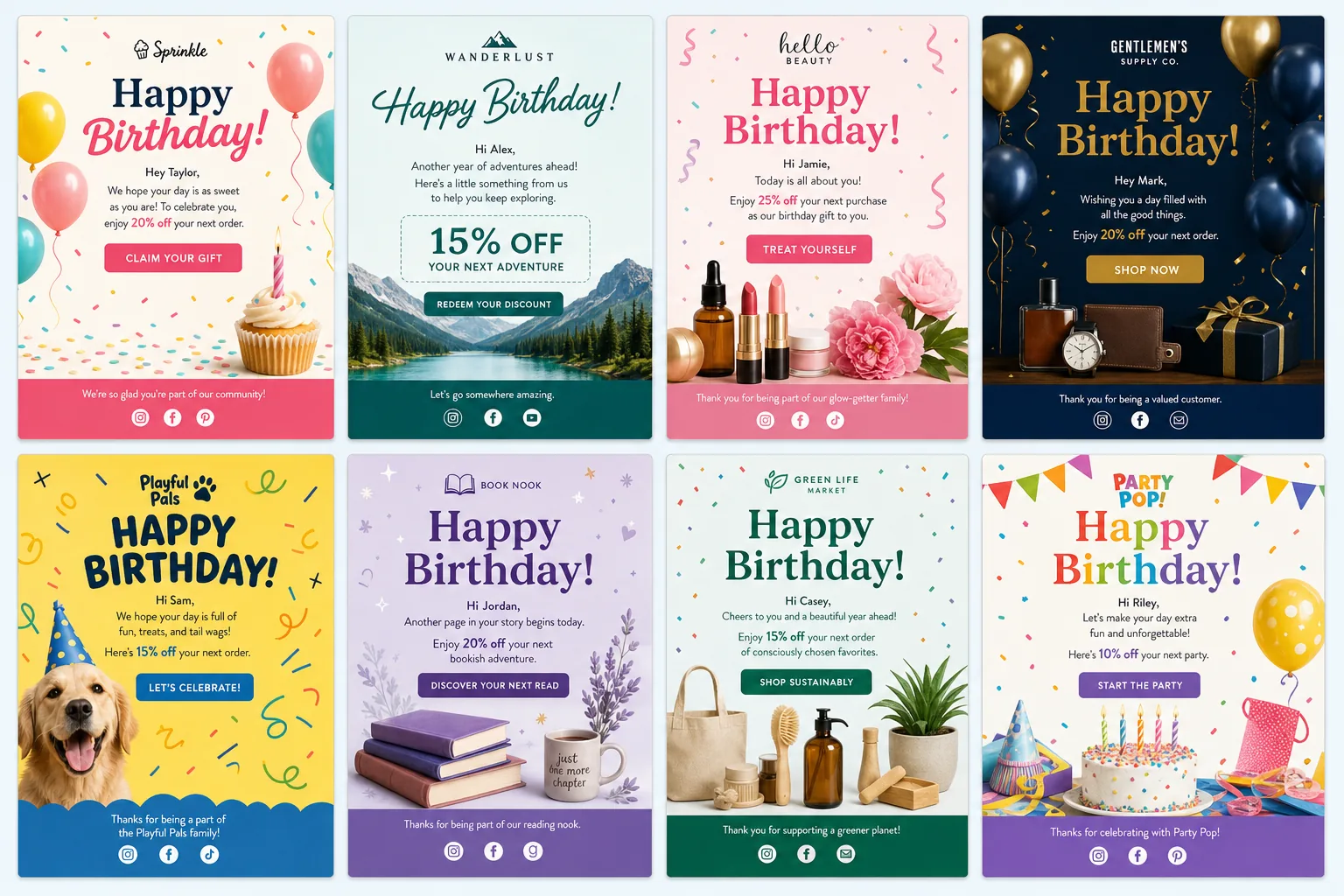
    Birthday emails are one of the easiest lifecycle moments to overlook and one of the most useful to systematize. The customer has already shared a personal date, the message has a natural reason to exist, and the offer can feel like a reward instead of a generic promotion. For CRM and lifecycle teams, strong birthday email examples are not just cute creative references. They are blueprints for an automated flow that can support retention, loyalty, repeat purchase, and brand affinity with relatively low operational effort.

    The best birthday campaigns usually have three things in common: a clear offer, a simple reason to act, and creative that feels personal without becoming complicated. The email does not need to carry a long story. It needs to make the recipient feel recognized, explain the birthday benefit, and remove friction from the next click.

    See also: email marketing campaign ideas

    Below are 10 practical birthday email examples organized by offer strategy first. Use them to decide what kind of birthday reward fits your brand, then refine the subject line, design, timing, and measurement plan around that decision.

    Why birthday emails deserve a dedicated lifecycle flow

    A birthday email should not be treated like a one-off promotional blast with balloons added. It deserves a dedicated lifecycle flow because the message is triggered by customer data, arrives in a predictable personal moment, and can be tailored by lifecycle stage, loyalty tier, purchase history, or engagement level.

    For email marketers, the main advantage is relevance. A birthday message has built-in context. The recipient understands why they are receiving it, which can make the offer feel less intrusive than a standard sale announcement. For designers, the challenge is to make the celebration obvious while keeping the offer and call to action easy to understand on mobile. For CRM teams, the opportunity is to create a reliable automated touchpoint that can be measured, tested, and improved over time.

    A strong birthday email flow usually includes:

    • A clear primary offer: The recipient should understand the reward within seconds.
    • A visible expiration window: The deadline should motivate action without creating unnecessary pressure.
    • Personalization where it helps: First name, loyalty tier, preferred category, or nearby store details can add relevance when the data is reliable.
    • Mobile-first creative: The reward, code, and CTA should remain readable in a narrow viewport.
    • Fallback logic: If the birthday date is incomplete or the customer is ineligible for an offer, the automation should not break or send an awkward message.

    The following birthday email examples are designed as strategic patterns, not templates to copy word for word. The right version depends on your margins, product category, purchase frequency, and customer expectations.

    10 birthday email examples with great offers, grouped by promotion type

    1. Percentage discount birthday offer

    Example offer: “Happy birthday. Enjoy 20% off your next order this month.”

    A percentage discount is one of the most familiar birthday offer types because it is easy to understand and easy to apply across a catalog. It works especially well for apparel, beauty, home goods, accessories, and other categories where customers may browse multiple products before choosing.

    Why it works: The offer feels flexible. Instead of pushing a single item, it lets the customer choose their own gift. That makes it useful when your customer base has diverse preferences or when your product range is broad.

    How to adapt it: Use a higher percentage for loyalty members, a lower percentage for first-time buyers, or category-specific exclusions if margin protection is important. Keep the code simple and place it near the CTA so the recipient does not need to search for it.

    2. Dollar-off birthday reward

    Example offer: “Here’s $15 toward your birthday treat.”

    A fixed-value reward can feel more tangible than a percentage discount. For many recipients, “$15 off” is easier to evaluate than “15% off,” especially when average order values are moderate and the savings are immediately clear.

    Why it works: Dollar-off offers feel like stored value. They can read as a birthday credit rather than a discount, which often feels more personal and gift-like.

    How to adapt it: Set a minimum spend carefully. “$15 off $75” may protect margin, but “$15 birthday credit” sounds more generous. If a minimum is necessary, make it visible before the click so customers do not feel surprised at checkout.

    3. Free gift with purchase

    Example offer: “Choose a free birthday gift with your next order.”

    A free gift with purchase is a useful birthday email example for brands that want to protect discount perception. Instead of lowering the price of the main product, the campaign adds a special item that feels celebratory.

    Why it works: The customer gets something extra. That aligns naturally with the birthday moment and can introduce trial of a new product, seasonal item, sample, or accessory.

    How to adapt it: Let customers choose from two or three gift options if inventory allows. Choice increases perceived relevance without requiring complex personalization. If the gift is predetermined, show it clearly and explain the value.

    4. Completely free birthday item

    Example offer: “Your birthday drink is on us.”

    This format is common for food, beverage, wellness, and local retail brands, but it can also work for digital products, samples, add-ons, or low-cost accessories. The offer is simple: no discount math, no complicated bundle, just a gift.

    Why it works: A free item creates a strong sense of goodwill. It can drive store visits, app engagement, or account logins even when the recipient was not already planning to buy.

    How to adapt it: Make redemption instructions extremely clear. If the customer must show an email, open an app, log in, or visit a store, the email should explain that process in plain language.

    5. Free shipping birthday perk

    Example offer: “Birthday perk unlocked: free shipping on your next order.”

    Free shipping is a practical birthday offer for ecommerce teams that want to reduce purchase friction without running a deeper product discount. It is especially useful when shipping cost is a common barrier to conversion.

    Why it works: It removes a known checkout objection. The offer may not feel as exciting as a free product, but it can be effective for customers who already have purchase intent.

    How to adapt it: Pair free shipping with curated birthday picks, back-in-stock products, or previously browsed categories. If free shipping alone feels too light, combine it with early access or a small sample.

    6. Bonus loyalty points

    Example offer: “Celebrate with 500 bonus points in your account.”

    Bonus points are a strong fit for brands with established loyalty programs. They reinforce program value and encourage customers to return to their account rather than simply redeeming a one-time coupon.

    Why it works: Points can create a sense of progress. If the customer is close to a reward threshold, the birthday bonus may motivate another purchase or login.

    How to adapt it: Show the customer’s current point balance if your data is reliable. If not, use a simpler message: “We added 500 birthday points. Log in to see your balance.” Avoid making the email dependent on dynamic content that may fail or display incorrectly.

    7. Tiered birthday reward for loyalty members

    Example offer: “Gold members get a $25 birthday reward this month.”

    For more context, according to McKinsey offers additional background on this topic.

    A tiered birthday reward gives your loyalty program a visible benefit. Instead of sending the same offer to every subscriber, the birthday email reinforces the value of being in a higher-status segment.

    See also: christmas email template
    Why it works: It makes loyalty status feel meaningful. The reward becomes part of the membership experience, not just another campaign.

    How to adapt it: Create simple tiers such as standard, VIP, and top-tier members. The difference can be reward value, redemption window, gift choice, or access to exclusive products. Keep the logic manageable so the campaign remains easy to QA.

    8. Birthday upgrade offer

    Example offer: “Enjoy a complimentary upgrade for your birthday.”

    Upgrade offers work well for subscriptions, travel, hospitality, software, services, memberships, and premium experiences. Instead of reducing the price, the campaign lets the customer experience a higher level of value.

    Why it works: It creates a trial moment. Customers can experience premium features, elevated service, faster delivery, a larger size, or a better package in a context that feels like a gift.

    How to adapt it: Define the upgrade clearly. “Upgrade” is vague unless the email states what changes: premium plan for 30 days, deluxe room when available, larger size, priority support, or enhanced service package.

    9. Exclusive birthday access

    Example offer: “Birthday access: shop the new collection before everyone else.”

    Not every birthday offer has to be a discount. Exclusive access can be effective for brands with limited drops, seasonal collections, waitlists, communities, or content-based products.

    Why it works: It taps into status and recognition. The customer feels invited rather than sold to, which can be valuable for premium brands that avoid frequent discounting.

    How to adapt it: Make the exclusivity concrete. Early access should have a real window, such as 24 or 48 hours. If access is not truly limited, the message can feel hollow.

    10. Limited-time birthday bundle

    Example offer: “Build your birthday bundle and save.”

    A birthday bundle can increase average order value while still giving the customer a celebratory reason to buy. It works well when products are naturally complementary, such as skincare routines, stationery sets, coffee assortments, home essentials, or hobby kits.

    Why it works: Bundles make choice easier. Instead of asking the customer to browse the entire catalog, the email presents a curated path.

    How to adapt it: Offer two or three bundle options by use case, price point, or customer type. Keep the CTA focused: “Build your bundle,” “Choose your set,” or “Claim your birthday bundle.”

    How to choose the right birthday offer

    The best offer is not always the richest offer. It is the one that matches customer motivation, product economics, and the role of the birthday email in your lifecycle program. A high-margin ecommerce brand may comfortably test a percentage discount. A premium brand may prefer exclusive access. A loyalty-led brand may get more long-term value from points than from a one-time coupon.

    Use these decision criteria before choosing from the birthday email examples above:

    • Product category: Consumables and food brands can often use free items effectively. Apparel and home brands may benefit from percentage discounts. Subscription and service brands may be better suited to upgrades or trial extensions.
    • Margin structure: If margins are tight, consider free shipping, points, access, samples, or gifts with purchase instead of broad discounts.
    • Purchase frequency: If customers buy often, a short redemption window may be enough. If purchases are considered or seasonal, give the birthday reward more time.
    • Brand positioning: Premium brands may want to avoid language that feels like clearance promotion. Use “birthday reward,” “gift,” “credit,” or “private access” instead of aggressive sale language.
    • Lifecycle stage: New subscribers may need a stronger incentive to make a first purchase. Existing customers may respond well to loyalty points, upgrades, or category recommendations based on past behavior.

    There is also a psychological difference between discounts and gifts. Discounts reduce the price of a transaction; gifts can create a stronger sense of reciprocity and recognition. This is a useful place to later add an authoritative citation on promotional psychology, customer loyalty, or email marketing best practices.

    Practical rule: if the birthday email is meant to drive immediate revenue, start with a clear monetary offer. If it is meant to deepen loyalty, consider a gift, points, access, or upgrade that feels more personal than promotional.

    Subject line patterns that make birthday emails stand out

    The subject line should make the birthday context and offer obvious without sounding like every other automated email in the inbox. The goal is not to be clever at the expense of clarity. A good birthday subject line tells the recipient why the message matters now.

    Useful patterns include:

    • Name plus celebration: “Maya, your birthday surprise is here”
    • Offer-led: “Your $15 birthday reward is waiting”
    • Deadline-led: “Last week to use your birthday gift”
    • Loyalty-led: “A birthday perk for our Gold members”
    • Simple and warm: “Happy birthday from us to you”
    • Curiosity with clarity: “We saved a birthday treat for you”

    Preview text should complete the inbox package. If the subject line says “Your birthday surprise is here,” the preview text can clarify: “Enjoy 20% off your next order through the end of the month.” If the subject line already includes the offer, the preview text can explain timing or redemption: “Use your reward online or in store before May 31.”

    Avoid subject lines that overuse punctuation, all caps, or vague urgency. “HURRY!!! Birthday deal inside” may attract attention, but it can weaken brand trust. The best birthday email subject lines feel celebratory and direct: personal enough to be relevant, clear enough to be understood at a glance.

    Design and accessibility tips for birthday email creatives

    Birthday email design can be playful, but the offer still needs to be functional. Designers should build around a clear visual hierarchy: celebration first, offer second, CTA third, supporting details fourth. If the recipient has to scroll past a large image before understanding the reward, the creative is working against the campaign goal.

    For responsive HTML email teams, focus on these execution details:

    • Make the offer readable without zooming: Use large text for the reward and avoid placing essential details only inside an image.
    • Use one primary CTA: “Claim your birthday reward” is usually stronger than multiple competing buttons.
    • Keep the code visible: If a promo code is required, place it near the CTA and repeat it in the supporting copy if needed.
    • Design for thumb taps: Buttons should be large enough to tap comfortably on mobile, with enough spacing from surrounding elements.
    • Balance festive visuals with brand consistency: Balloons, confetti, cake, candles, and gift shapes can work, but they should not make the email feel disconnected from the brand.
    • Plan for dark mode: Check whether key colors, logos, and CTA styles remain legible when clients invert or adjust colors.

    Accessibility should be part of the creative brief, not a final QA note. Use strong color contrast for text and buttons. Keep live text for the main offer whenever possible. Write alt text that communicates the purpose of an image, not just the decoration. For example, “Birthday gift box illustration” is fine for a decorative image, but “Enjoy $15 off your birthday order” should be live text, not trapped in an image with missing alt text.

    Also consider fallback content. If dynamic personalization fails, the email should still read naturally. “Happy birthday!” is safer than “Happy birthday, FIRSTNAME!” if your merge tag process is not fully reliable. For complex loyalty or points modules, define what appears when the balance is unavailable.

    Implementation checklist: timing, segmentation, and measurement

    A birthday email campaign is only as strong as its operational setup. Before launching, map the data source, eligibility rules, send timing, offer logic, and reporting framework. The more automated the flow, the more important the checklist becomes.

    Use this practical checklist for deployment:

    • Confirm the birthday data field: Decide whether you need month and day only, or full date of birth. Collect only what you need.
    • Set the send window: Common options include the first day of the birthday month, one week before the birthday, the birthday itself, and a final reminder before expiration.
    • Define expiration logic: Use a clear redemption period, such as 14 days, birthday month, or 30 days from send.
    • Segment by customer status: New subscriber, first-time buyer, repeat customer, loyalty member, lapsed customer, and VIP segments may warrant different offers.
    • Suppress where needed: Avoid overlapping with sensitive journeys, recent service issues, unsubscribed contacts, or customers in regions where the promotion is not valid.
    • QA every version: Test merge tags, coupon codes, loyalty modules, expiration dates, mobile rendering, dark mode, and fallback content.
    • Measure beyond opens: Track click-through rate, redemption rate, revenue, average order value, repeat purchase, loyalty engagement, and unsubscribe rate.
    • Test one variable at a time: Start with offer type, then test timing, subject line, creative layout, CTA language, or reminder cadence.

    For many teams, the best starting flow is simple: one birthday email at the beginning of the birthday month and one reminder before the reward expires. Once that baseline is stable, add segmentation and testing. A VIP customer might receive a richer reward. A lapsed customer might receive a stronger incentive. A highly engaged customer might only need exclusive access or bonus points.

    Use these birthday email examples as a blueprint for building a clearer, more effective birthday flow in your CRM program. Start with the offer, then tighten the subject line, design, accessibility, timing, and measurement plan. When each part supports the same goal, the birthday email becomes more than a polite greeting. It becomes a dependable lifecycle touchpoint that feels personal, on-brand, and easy to act on.

    See also: outlook html email template

  • Email Marketing Campaign Ideas With Ready Templates: Seasonal, Launch, Nurture, and Re-Engagement Plays for Practitioners

    Email Marketing Campaign Ideas With Ready Templates: Seasonal, Launch, Nurture, and Re-Engagement Plays for Practitioners

    The best email marketing campaign ideas are not random one-off sends. They are repeatable plays your team can adapt across segments, seasons, and lifecycle stages without rebuilding every email from scratch. For CRM teams, lifecycle marketers, and email designers, the real advantage comes from pairing a strong campaign concept with a practical template structure: a reusable hero, flexible content modules, accessible copy, responsive layouts, and clear measurement.

    This guide organizes campaign ideas by how they actually get used: seasonal sends, launch sequences, nurture flows, and re-engagement tactics. Each section includes ready-to-adapt template direction so your team can move from idea to brief to HTML email faster. Use it to build a campaign template library that supports planning, production, testing, and performance review across B2B and B2C programs.

    See also: christmas email template
    Why campaign ideas need a lifecycle framework, not just a list

    A long list of campaign ideas can be useful for brainstorming, but it rarely solves the operational problem. Most email teams are not short on possible sends. They are short on campaign ideas that match a specific audience, business goal, production timeline, and available template. A lifecycle framework helps you decide which idea is worth sending now, which segment should receive it, and which reusable email structure will make it efficient to produce.

    Before choosing a campaign, map it to four practical criteria:

    • Lifecycle stage: Is the audience new, active, evaluating, purchasing, onboarding, loyal, inactive, or at risk?
    • Primary goal: Are you driving revenue, registrations, product adoption, education, retention, preference collection, or reactivation?
    • Segment relevance: Can the message be personalized by behavior, profile, purchase history, content interest, account type, or engagement level?
    • Template fit: Can you produce the email with existing modules, or will it require new design, new code, and extra QA?

    This is where a template-first approach becomes valuable. Instead of asking, “What should we send this week?” ask, “Which lifecycle goal needs support, and which template can help us execute quickly?” A single modular template can support a seasonal promotion, an educational nurture email, or a product announcement if the structure is built around adaptable content blocks.

    A useful campaign planning record should include the campaign name, audience, lifecycle stage, send trigger or date, core message, template type, required modules, personalization fields, accessibility notes, and primary metric. Over time, this creates a library of proven campaign patterns rather than a folder of disconnected email files.

    Seasonal email campaign ideas that are easy to adapt with reusable templates

    Seasonal campaigns work best when they connect the moment on the calendar to a specific subscriber need. Holidays, back-to-school periods, Black Friday and Cyber Monday, New Year planning, financial-year deadlines, awareness months, and industry-specific events can all be strong opportunities. The key is to avoid treating every seasonal send as a custom creative project. Build a master seasonal template that can be refreshed with new imagery, copy, offers, and countdown modules.

    Template idea: Holiday offer email

    Core message: A timely promotion or curated recommendation connected to a holiday or cultural moment.

    Recommended structure: Seasonal hero, short value statement, featured offer or product grid, supporting benefit bullets, primary CTA, secondary CTA, terms or deadline note.

    Adaptation tips: Use the same layout for different audience groups by changing the product recommendations, discount language, or benefit angle. For example, new subscribers may receive a first-purchase incentive, while loyal customers may receive early access or a curated bundle.

    Template idea: New Year planning email

    Core message: Help subscribers start the year with a plan, checklist, reset, or recommended next step.

    Recommended structure: Goal-oriented hero, three-step plan, recommended resource or offer, testimonial-style proof point if available, CTA to start.

    Adaptation tips: This template can work for SaaS adoption goals, ecommerce replenishment, professional services planning, education programs, or membership renewals. Swap the central content module from “plan” to “checklist” to “recommended next action” depending on the audience.

    Template idea: Black Friday or Cyber Monday urgency email

    Core message: A limited-time offer with a clear reason to act now.

    Recommended structure: High-contrast hero, offer summary, deadline, featured items or benefits, urgency module, CTA, fine print.

    Adaptation tips: Keep urgency accessible and easy to understand. Do not rely only on color, flashing graphics, or image-based text to communicate deadlines. If using a countdown, include the deadline in live text as well. Make the CTA specific, such as “Shop the 24-hour offer,” “Reserve your seat,” or “See eligible plans.”

    Seasonal emails are also a good place to enforce design guardrails. Create approved image ratios, fallback background colors, alt text patterns, and button styles. This allows designers to make the campaign feel current without forcing developers to rebuild the email every time a new holiday appears on the calendar.

    Launch campaign ideas for product, feature, content, and event announcements

    Launch campaigns are stronger when they are treated as sequences, not single announcements. A launch sequence gives you multiple chances to build interest, explain value, handle objections, and create urgency. The same ready template set can be adapted for product launches, feature announcements, webinar registrations, report releases, event promotions, and content series.

    A practical launch sequence can include four emails:

    • Teaser: Introduce the problem, hint at what is coming, and invite subscribers to watch for the announcement.
    • Announcement: Reveal the product, feature, event, or content asset with a clear value proposition.
    • Reminder: Reinforce the benefit, answer likely questions, and address barriers to action.
    • Last call: Use a deadline, registration closing date, bonus expiration, or timely reason to act.

    Template idea: Launch announcement email

    Core message: Show what is new, why it matters, and what the subscriber should do next.

    Recommended structure: Launch hero, one-sentence positioning statement, three value bullets, visual or product module, primary CTA, FAQ block, secondary support link placeholder for future internal linking.

    Adaptation tips: For a product launch, lead with the customer problem and new capability. For a feature launch, focus on the workflow improvement. For a webinar, replace the product module with speaker, agenda, and date modules. For a report or guide, use the same structure but shift the CTA to download or read.

    Template idea: Launch reminder email

    Core message: Remind interested subscribers why the launch is relevant and reduce hesitation.

    Recommended structure: Short hero, “Still deciding?” intro, objection-handling bullets, social proof or credibility module if available, FAQ, CTA.

    Adaptation tips: Segment reminder emails by behavior. People who clicked but did not convert may need more detail. People who opened but did not click may need a clearer value proposition. People who missed the first email may need a concise recap rather than a reminder tone.

    Placeholder for an authoritative citation on deliverability, consent, or inbox placement best practices to be added during editorial review.

    For production efficiency, create a launch template family with consistent modules: hero, value bullets, CTA row, FAQ, date-and-time block, speaker or author block, and feature detail block. A shared design system helps subscribers recognize the campaign while allowing marketers to adapt content for different launch types.

    Nurture campaign ideas that keep subscribers engaged between major sends

    Nurture campaigns fill the space between big launches and seasonal promotions. They help new subscribers understand your value, guide prospects toward conversion, support customer onboarding, and keep active audiences engaged. These email marketing campaign ideas are especially useful because they can be automated, personalized, and improved over time.

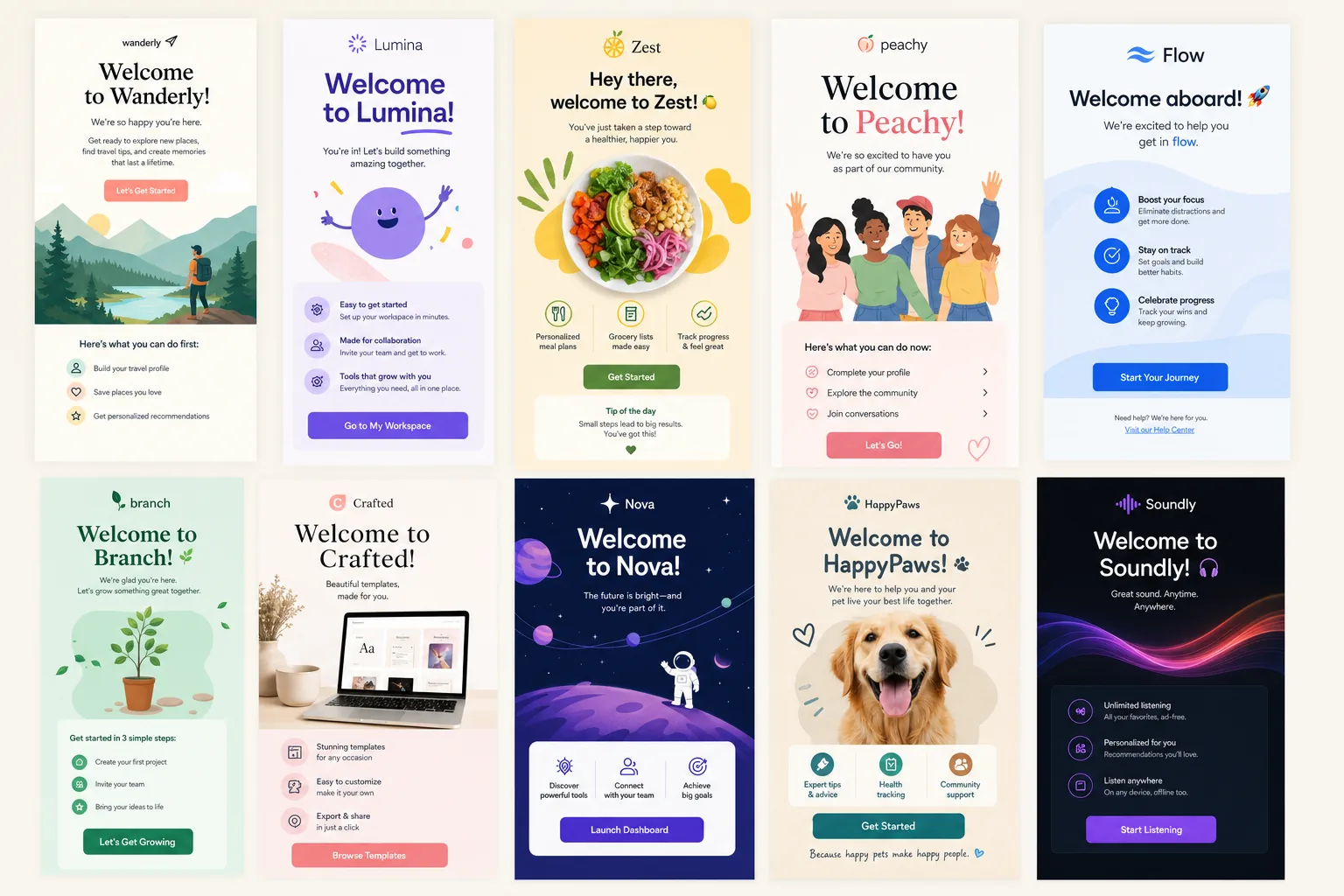
    Template idea: Welcome series

    Core message: Confirm the subscriber made a good choice and guide them to the next useful action.

    Recommended structure: Friendly hero, expectation-setting paragraph, top three resources or benefits, preference prompt, CTA.

    Sequence approach: Send an immediate welcome email, followed by an educational email, then a conversion or profile-building email. For customers, replace conversion content with onboarding steps, account setup guidance, or usage tips.

    Template idea: How-to or tip email

    Core message: Teach one useful action the subscriber can complete quickly.

    For more context, Backlinko offers additional background on this topic.

    Recommended structure: Problem statement, numbered steps, visual support module, pro tip, CTA to learn more or try it.

    See also: outlook html email template

    Adaptation tips: Keep the email focused on one task. A good how-to email should not become a full guide. Use reusable step modules so the same template can support product education, styling tips, account setup, workflow improvement, or content recommendations.

    Template idea: Recommendation email

    Core message: Suggest relevant products, content, features, or next actions based on known interest or behavior.

    Recommended structure: Personalized intro, recommendation grid or stacked cards, reason-to-care copy, CTA per item or one primary CTA, preference-center prompt.

    Adaptation tips: Use dynamic modules where possible, but design for graceful fallback content. If personalization data is incomplete, show bestsellers, popular resources, recently updated content, or category-based recommendations instead of leaving modules empty.

    Template idea: Milestone email

    Core message: Recognize a customer or subscriber moment and use it to deepen engagement.

    Recommended structure: Celebration or acknowledgment hero, milestone summary, personalized insight if available, recommended next step, CTA.

    Adaptation tips: Milestones can include anniversaries, loyalty status changes, completed onboarding steps, usage achievements, subscription renewals, or content engagement. Keep the tone useful rather than overly congratulatory if the milestone is operational, such as renewal or account setup.

    For email designers, nurture templates should prioritize modularity and responsiveness. Create content blocks that can be stacked, removed, or reordered without breaking the layout. Use live text for key information, clear heading hierarchy, descriptive button copy, and image alt text that supports the message without duplicating every word.

    Re-engagement campaign ideas for inactive subscribers and lapsed customers

    Re-engagement campaigns are designed to learn whether inactive subscribers still want to hear from you and to recover people who may have lost interest. They also help protect list quality by reducing unnecessary sends to people who no longer engage. The strongest re-engagement emails are clear, respectful, and easy to act on.

    Template idea: Inactivity reminder

    Core message: Acknowledge the subscriber has been quiet and offer a useful reason to return.

    Recommended structure: Direct subject line, short intro, value reminder, one primary CTA, preference-center option.

    Subject line tests: Test straightforward versions against benefit-led versions. For example, compare “Still want updates from us?” with “New resources you may have missed.” Avoid misleading urgency or guilt-based language.

    Template idea: Preference update email

    Core message: Let subscribers control what they receive instead of forcing an all-or-nothing decision.

    Recommended structure: Clear explanation, preference categories, benefits of updating, CTA to manage preferences, unsubscribe note if required by your process.

    Adaptation tips: This email works well before suppressing inactive contacts. It can also be sent after a major change in content strategy, product categories, or sending frequency.

    Template idea: Value reminder email

    Core message: Remind subscribers what they originally signed up for and highlight what is currently useful.

    Recommended structure: Short opening, three value bullets, recent highlights module, CTA, preference option.

    Adaptation tips: Use different versions for prospects, customers, trial users, members, or past buyers. A lapsed buyer may need replenishment, new arrivals, or an incentive. An inactive SaaS user may need a workflow tip, training resource, or account review prompt.

    Template idea: Unsubscribe-prevention email

    Core message: Give the subscriber an easy final choice before reducing or stopping emails.

    Recommended structure: Plain-language intro, “keep me subscribed” CTA, “update preferences” option, clear explanation of what happens next.

    Accessibility guidance: Use a simple layout, readable font sizes, strong contrast, and descriptive CTAs. Do not hide the unsubscribe path or make preference management confusing. Re-engagement works best when it respects subscriber intent.

    For re-engagement templates, remove distractions. A one-clear-CTA layout usually performs better than a dense promotional design because the decision is simple: stay engaged, update preferences, or leave. Your creative can still reflect the brand, but the copy should be concise and the action should be obvious.

    How to turn these ideas into a reusable campaign library

    A campaign library turns strategy into repeatable execution. Instead of rebuilding every seasonal, launch, nurture, or re-engagement email, your team can select a proven template, update the content, run QA, and launch faster. The library should be easy for marketers, designers, developers, and CRM operators to understand.

    Start with a naming system that includes lifecycle stage, campaign type, version, and primary format. For example:

    • seasonal_promo_master_v1
    • launch_announcement_modular_v2
    • nurture_howto_single-topic_v1
    • reengagement_preference-update_v1

    For each template, document the following:

    • Goal: The primary business or lifecycle objective.
    • Best-fit audience: Segments that should receive this campaign type.
    • Required modules: Hero, CTA, product grid, FAQ, countdown, resource cards, preference block, or other components.
    • Editable fields: Headline, offer, deadline, CTA copy, personalization tokens, images, and fallback copy.
    • Accessibility notes: Alt text rules, live text requirements, contrast guidance, button copy standards, and mobile readability checks.
    • Measurement plan: Primary metric, secondary metric, conversion event, and post-send review notes.

    Version control matters. If a template is updated for better mobile rendering, accessibility, dark mode support, or module flexibility, record what changed and when. This avoids confusion when multiple teams are using similar files across campaigns.

    Use this checklist when choosing your next campaign idea:

    • Timing: Is there a seasonal moment, launch date, lifecycle trigger, or inactivity threshold that makes this send relevant now?
    • Audience: Which segment has the clearest need for this message?
    • Goal: What single action should the email drive?
    • Template: Which existing layout can support the message with the least custom work?
    • Creative resources: Do you need new imagery, or can the campaign use approved modules and live text?
    • Personalization: What data can improve relevance, and what fallback is needed?
    • Measurement: How will you know whether the campaign worked beyond opens and clicks?

    The most effective email programs do not rely on inspiration alone. They build reusable systems. By organizing your campaign library around lifecycle stages and ready templates, your team can launch stronger seasonal emails, clearer announcements, more useful nurture flows, and more respectful re-engagement campaigns without starting from zero every time.

    Next step: Download or build a reusable campaign template library so your team can plan, design, code, and launch seasonal, launch, nurture, and re-engagement emails faster.

    See also: cold email template

  • Christmas Email Template Ideas: Gift Guides, Offers, Greetings, and Subject Lines for Peak-Season Campaigns

    Christmas Email Template Ideas: Gift Guides, Offers, Greetings, and Subject Lines for Peak-Season Campaigns

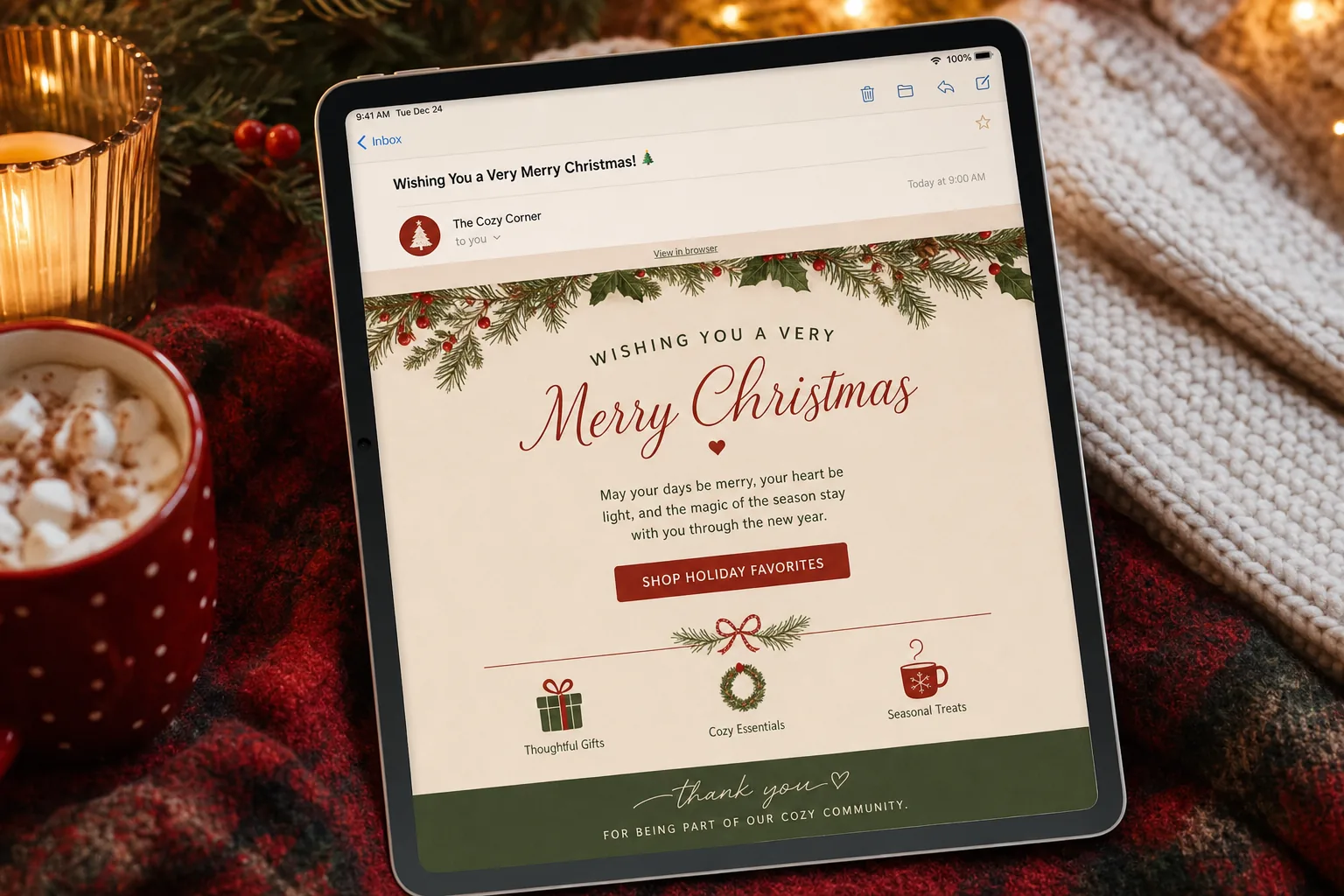
    Christmas campaigns ask a lot from email teams. Subscribers are comparing gifts, watching budgets, checking delivery dates, and scanning crowded inboxes at speed. A strong christmas email template gives marketers and designers a repeatable structure, but the best seasonal results rarely come from one generic layout reused for every send.

    For CRM, lifecycle, and email design teams, the better approach is campaign-first: define what the email needs to accomplish, then choose the template structure, message hierarchy, subject line, and call to action that support that goal. A gift guide should help subscribers choose. A promotional email should make the offer and next step unmistakable. A greeting should feel personal and human, not like a disguised sales blast. A deadline reminder should reduce hesitation and clarify urgency.

    See also: outlook html email template

    This guide breaks Christmas email planning into practical template types: gift guides, offer-led promotions, relationship-building greetings, and subject-line-driven send planning. Use it as a planning framework before design production, HTML build, QA, and segmentation.

    Why Christmas email templates need a campaign-first approach

    During the Christmas period, inbox competition increases while subscriber attention decreases. People are busy, timelines are compressed, and purchase intent can shift quickly from browsing to buying to last-minute problem solving. That means a Christmas email template should not only look festive; it should make the campaign purpose obvious within seconds.

    The most common mistake is building one attractive seasonal design and forcing every message into it. This usually leads to weak hierarchy: a gift guide looks like a promotion, a greeting feels like a sales email, and deadline reminders bury the most important information. Instead, start by assigning every campaign to a primary intent.

    • Gift guide campaigns: Help subscribers discover relevant gifts by recipient, price, category, interest, or urgency.
    • Offer-led campaigns: Drive action around a discount, bundle, free shipping threshold, loyalty incentive, or limited-time promotion.
    • Greeting campaigns: Strengthen the customer relationship with appreciation, reflection, holiday hours, community messaging, or a low-pressure seasonal note.
    • Deadline and send-planning campaigns: Use timing, subject lines, preview text, and concise content to support shipping cutoffs, final order dates, and post-Christmas opportunities.

    Once the goal is clear, template decisions become easier. The hero can lead with inspiration or urgency. The body can prioritize product grids, offer proof points, or a personal message. The call to action can be specific instead of generic. This matters for responsive HTML email because small-screen subscribers need a clear path without excessive scrolling or visual clutter.

    Christmas email template framework: what every seasonal email should include

    A reusable Christmas email template should give your team a reliable structure without locking every campaign into the same content pattern. Think in modular blocks that can be rearranged depending on the message.

    Core structure for a seasonal campaign email

    • Subject line and preview text: Set the expectation before the open. The preview text should extend the subject line, not repeat it.
    • Preheader area: If visible in the template, use it to reinforce the offer, delivery date, or key message.
    • Hero section: Communicate the main promise quickly. For Christmas, the hero should be festive but not so image-dependent that the email fails when images are blocked.
    • Primary message block: Explain the offer, gift idea, greeting, or deadline in plain language. Keep copy focused on one main idea.
    • Primary CTA: Use a specific action such as Shop gifts under $50, Check delivery dates, Build your bundle, or Read our holiday note.
    • Secondary content: Add supporting modules such as recommended categories, store hours, shipping reminders, loyalty benefits, or customer service information.
    • Footer: Keep required information, preference options, and compliance elements easy to find. Seasonal design should not reduce footer readability.

    For JQRD’s email marketing audience, the most useful template is not just a visual mockup. It is a production-ready structure that anticipates responsive behavior, accessibility, and common rendering constraints. Festive design choices should support the message, not compete with it.

    Mobile-first and accessibility considerations

    Most Christmas emails will be scanned quickly, often on mobile. Use a single-column structure for critical sections, large tappable CTAs, and short content blocks. Product grids can work well, but they need enough spacing and text hierarchy to remain readable on small screens.

    Balance imagery with live text. A beautiful hero image with all key copy embedded inside the graphic creates risk: the message may be invisible to screen readers, difficult to read on small screens, and lost when images are disabled. Use HTML text for the headline, offer, deadline, and CTA whenever possible.

    • Use descriptive alt text: Describe the purpose of meaningful images rather than stuffing alt text with marketing copy.
    • Maintain contrast: Red, green, gold, and cream can look seasonal but still need sufficient contrast for readability.
    • Avoid tiny decorative copy: Script fonts and low-contrast overlays often look festive in design files but fail in real inboxes.
    • Keep animation optional: Animated GIFs can add energy, but the first frame should communicate the message on its own.
    • Design buttons as bulletproof HTML where possible: Image-only buttons are fragile and less accessible.

    A practical christmas email template should also leave space for localization, segmentation, and legal requirements. If your team sends to multiple regions, avoid hardcoding shipping claims, dates, or promotional terms directly into images. Keep deadline content modular so CRM teams can update it without rebuilding the entire email.

    Gift guide templates: how to organize product recommendations that actually help subscribers

    Gift guides work because they reduce choice overload. The role of the template is to help subscribers find the right path quickly, not to display every possible product. Start by deciding how the audience is most likely to shop.

    • By recipient: Gifts for partners, parents, kids, coworkers, hosts, clients, or hard-to-buy-for people.
    • By price point: Under $25, under $50, premium gifts, stocking stuffers, or luxury picks.
    • By category: Bestsellers, new arrivals, personalized items, digital gifts, subscriptions, accessories, or bundles.
    • By urgency: Ships today, arrives before Christmas, last-minute gifts, e-gift cards, or pickup options.
    • By customer behavior: Based on browsing history, previous purchases, loyalty tier, wishlists, or abandoned categories.

    The best gift guide templates usually start with a clear framing line, then move into scannable recommendation blocks. For example, instead of a broad headline like Holiday Gift Guide, use a more useful promise such as Thoughtful gifts for every budget or Last-minute gifts that still feel personal.

    For the body layout, prioritize clarity over density. A three-column desktop product grid may collapse into a long mobile email, so make sure each product card earns its space. Include a short product name, a useful descriptor, price or price range when appropriate, and a CTA that matches the buying stage.

    Gift guide copy and design patterns

    • Use category headers as decision shortcuts: Examples include For the homebody, For the frequent traveler, or For the person who has everything.
    • Keep product descriptions benefit-led: Replace vague adjectives with practical reasons the item makes a good gift.
    • Add social proof carefully: If using bestseller labels or review snippets, keep them concise and credible.
    • Use personalization fields only when useful: A first name in the headline matters less than recommendations based on actual interest or lifecycle stage.
    • Include a fallback path: Add a secondary CTA such as Shop all gifts or Browse gift cards for subscribers who do not fit the main segments.

    This is also a natural section of a future article to support with an authoritative citation on holiday shopping behavior, gifting trends, or consumer decision-making. Leave room in your editorial workflow for one data point that explains why curated recommendations help during peak season.

    Planning note: when a gift guide includes many products, define the primary decision path before design begins. If the subscriber cannot tell whether to shop by recipient, price, or category, the template is trying to do too much.

    For more context, Nielsen Norman Group offers additional background on this topic.

    See also: cold email template

    Offer-led Christmas templates: promos, urgency, and clear calls to action

    Offer-led Christmas emails need discipline. A strong promotion can still underperform if the template hides the value, splits attention across too many messages, or makes the next step unclear. The subscriber should understand three things immediately: what the offer is, why it matters now, and what to do next.

    Start the hero with the most important offer information. If the campaign is built around a discount, state the discount clearly. If the campaign is about a shipping cutoff, make the date impossible to miss. If it is a bundle, explain the bundle value in plain language. Avoid leading with abstract seasonal phrases when the real reason to open and click is practical.

    Promotional template blocks that work well

    • Offer hero: A concise headline, supporting line, and CTA focused on the main promotion.
    • Deadline strip: A visually distinct line for order-by dates, store pickup deadlines, or promotion end times.
    • Value explanation: One or two bullets explaining what is included, how savings work, or what qualifies.
    • Recommended products or categories: A limited set of paths tied to the offer, not a full catalog dump.
    • Trust and service details: Shipping, returns, gift wrapping, extended support, or holiday hours where relevant.

    For lifecycle and CRM teams, offer-led templates are not limited to ecommerce newsletters. A subscription brand might promote annual plans before the new year. A SaaS company might send a customer appreciation credit or limited-time upgrade message. A membership organization might remind lapsed members about a holiday incentive. In each case, the same template logic applies: one offer, one reason to act, one primary CTA.

    Urgency should be visible but not overwhelming. Countdown language, deadline labels, and last-chance modules can help when they are true and specific. Overusing urgency across every send trains subscribers to ignore it. Reserve stronger urgency for real cutoffs such as final shipping dates, expiring discounts, limited inventory, or closing holiday support windows.

    CTA specificity is especially important in promotional Christmas emails. Shop now is serviceable, but often weaker than Shop 30% off gifts, Get it before Christmas, or Choose your bundle. The CTA should complete the sentence created by the headline.

    Greeting and relationship-building emails: seasonal messages that keep the brand human

    Not every Christmas email needs to sell. Greeting emails can protect the relationship during a noisy commercial season, especially for customer, member, donor, VIP, or long-term subscriber segments. The template should feel intentionally quieter than a promotion.

    A good seasonal greeting starts with the audience relationship. A message to first-time customers should not sound the same as a message to VIP buyers, annual members, employees, or dormant subscribers. The copy should answer: why are we contacting this person, and what would feel relevant or appreciated?

    • Customer appreciation: Thank subscribers for being part of the brand’s year and acknowledge their support.
    • VIP or loyalty message: Recognize the relationship without overloading the email with sales language.
    • Community or mission note: Share a concise reflection, milestone, or seasonal message tied to brand values.
    • Operational greeting: Pair warm holiday wishes with useful information such as holiday hours, support availability, or service changes.

    The design can be simpler: a warm hero, a short message, a signature or team sign-off, and perhaps one light secondary action. That action might be Visit our holiday hub, See support hours, Explore gift ideas, or Read the year-end note. If the primary goal is appreciation, do not let the secondary CTA overpower the message.

    Personalization can help, but only if it feels natural. A first-name greeting is fine; a message that references loyalty status, membership year, or recent activity may be more meaningful when accurate. Avoid forced sentimentality. Brands can be warm and concise at the same time.

    Christmas subject line ideas and testing approach for higher open intent

    Subject lines carry extra weight during Christmas because subscribers are triaging. The goal is not simply to sound festive; it is to create accurate open intent. A subject line should match the campaign type, offer strength, send timing, and subscriber segment.

    Gift guide subject line ideas

    • Gifts for everyone still on your list
    • Thoughtful Christmas gifts by budget
    • Need gift ideas? Start here
    • Our easiest gifts to give this Christmas
    • Last-minute gifts that do not feel last-minute

    Offer and promotion subject line ideas

    • Christmas deals end soon
    • Save on gifts before the deadline
    • Today only: holiday bundles are on offer
    • Your Christmas discount is inside
    • Final hours for festive savings

    Greeting subject line ideas

    • A Christmas note from our team
    • Thank you for being with us this year
    • Wishing you a warm and happy Christmas
    • A small holiday message for you
    • Before the year ends, thank you

    Deadline reminder subject line ideas

    • Order by tonight for Christmas delivery
    • Last call for gifts that arrive in time
    • Christmas delivery cutoff: today
    • Still shopping? Check these final options
    • Gift cards are still available

    Keep subject lines clear before they are clever. Shorter lines often work better on mobile, but clarity matters more than an arbitrary character count. If you use emojis, use them as accents, not replacements for meaning. A tree, gift, or snowflake can add seasonal recognition, but it should not be the only signal of the email’s value.

    Preview text should be planned with the subject line, not added at the end of production. Use it to answer the next question. If the subject line says Order by tonight for Christmas delivery, the preview text might clarify See eligible gifts and shipping options before the cutoff. If the subject line says Thoughtful Christmas gifts by budget, the preview text might add Browse picks under $25, $50, and $100.

    For testing, compare meaningful differences rather than tiny wording changes. Test a benefit-led subject line against an urgency-led one. Test price-point framing against recipient framing for a gift guide. Test a warm greeting subject line against a more brand-specific note. The goal is to learn which intent best matches the segment and send moment.

    • Audience fit: Returning customers may respond to loyalty or appreciation, while prospects may need clearer value.
    • Offer strength: A strong discount can lead the subject line; a softer offer may need a benefit or gift angle.
    • Timing: Early-season sends can focus on inspiration, while late-season sends should emphasize deadlines and certainty.
    • Message type: Do not make a greeting look like a promotion if the email itself is primarily relationship-building.

    The most effective Christmas email planning happens before the design file is polished. Define the campaign goal, choose the right template structure, write the subject line and preview text as a pair, and build responsive modules that keep the message clear. When every christmas email template is tied to a specific intent, seasonal campaigns become easier to produce, easier to read, and easier for subscribers to act on.

    See also: welcome email examples

  • Best HTML Email Templates Compatible With Outlook: How to Choose, Fix, and Test Outlook HTML Email Templates

    Best HTML Email Templates Compatible With Outlook: How to Choose, Fix, and Test Outlook HTML Email Templates

    Choosing an outlook html email template is less about finding the most visually impressive design and more about finding a structure that survives Outlook’s rendering rules. For email marketers, CRM teams, lifecycle marketers, and email designers, Outlook remains one of the most demanding environments to support because it does not behave like Gmail, Apple Mail, or many mobile clients.

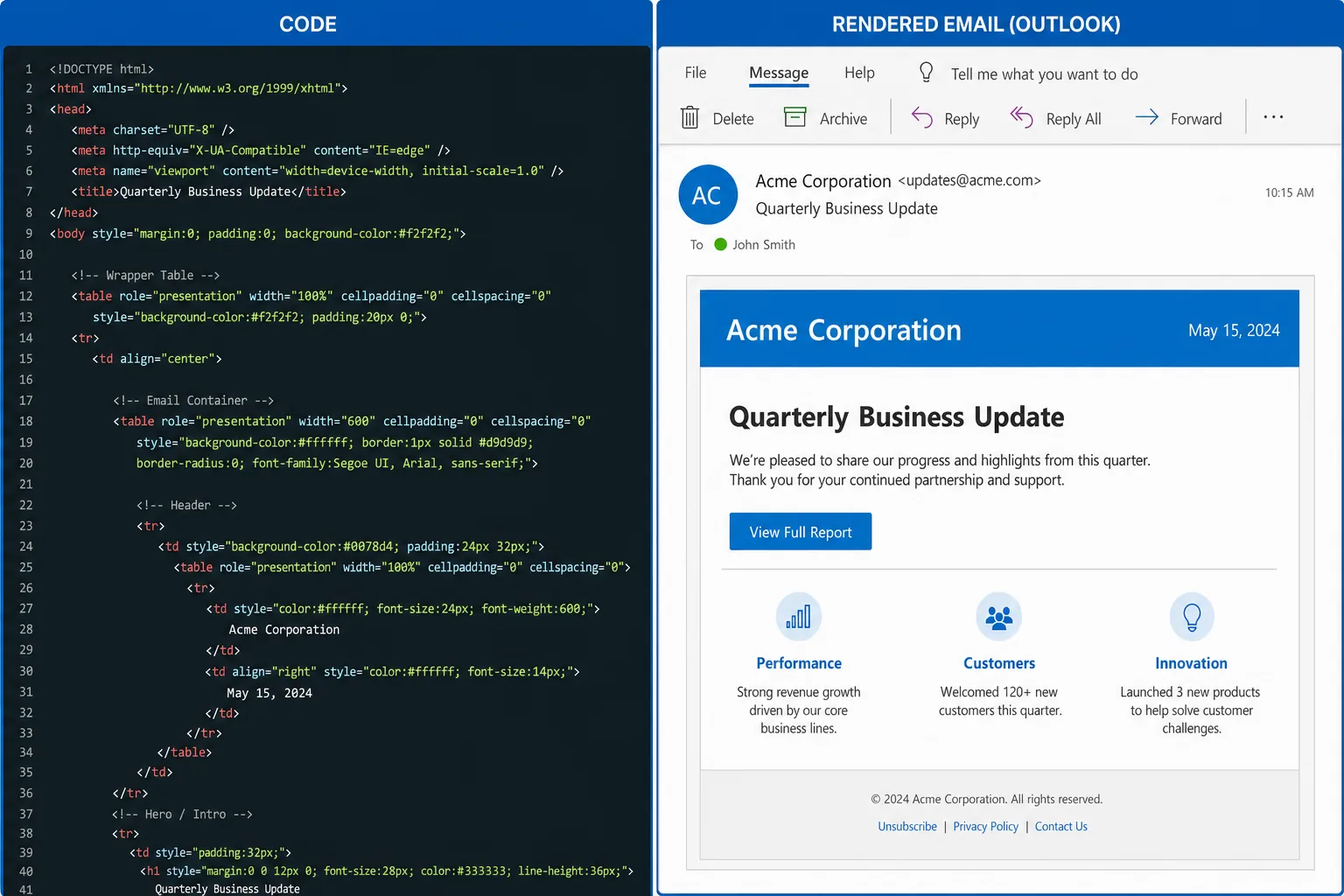
    A template that looks polished in a browser preview can still fail in Outlook desktop: columns may collapse unpredictably, buttons may lose padding, background images may disappear, fonts may shift, and spacing can look uneven. The best Outlook-compatible templates are not accidental. They are built with tables, inline CSS, conservative layout choices, VML where needed, and a testing workflow that catches rendering differences before a campaign reaches subscribers.

    See also: cold email template

    This guide explains what to look for when selecting or building an Outlook-safe HTML email template, how to evaluate common design patterns, and how to test templates before deployment. It is written for teams that need repeatable email production, not one-off design experiments.

    Why Outlook breaks “good” email design

    Outlook is difficult because several versions of Outlook do not use the same rendering approach as modern webmail clients. Many desktop versions rely on Microsoft Word’s rendering engine for HTML email. That matters because Word was not designed to interpret email layouts the way a browser does. As a result, CSS that works in Gmail or Apple Mail may be ignored, partially supported, or interpreted differently in Outlook desktop.

    The most common symptoms include inconsistent padding, unexpected gaps between sections, distorted buttons, missing background images, broken rounded corners, font substitutions, and image scaling problems. Even simple design decisions, such as using CSS margins or relying on div-based layout, can introduce rendering issues in Outlook.

    Outlook web and Outlook desktop should also be treated as different environments. Outlook on the web generally behaves more like a browser-based email client, while Outlook desktop can require older email coding techniques. A dependable template needs to account for both without creating separate designs for every campaign.

    For JQRD’s audience of campaign and lifecycle teams, the practical issue is not whether Outlook is technically behind other clients. The issue is production risk. If a promotional email, onboarding message, billing notice, or newsletter renders poorly for a meaningful portion of the audience, the campaign can lose clarity and credibility. In lifecycle programs, a broken call-to-action or unreadable layout can affect conversion, support load, and user trust.

    An Outlook-safe template should therefore be judged by practical criteria:

    • Predictable layout: The structure should hold across Outlook desktop, Outlook web, Gmail, Apple Mail, and major mobile clients.
    • Readable typography: Font choices should degrade gracefully when custom fonts are not supported.
    • Reliable CTAs: Buttons should remain visible, clickable, and legible even when advanced CSS is ignored.
    • Fallback-safe imagery: Designs should still communicate the message if background images or remote images are blocked.
    • Maintainable code: Marketers and email developers should be able to edit modules without breaking the layout.

    What an Outlook-compatible HTML email template must include

    A strong outlook html email template starts with a structure that respects the limitations of email clients. The safest foundation is still a table-based layout. While modern web design has moved away from tables for page layout, HTML email remains a different environment. Tables provide a level of layout consistency that div-based designs often cannot guarantee across Outlook desktop versions.

    The core container should usually be a fixed-width or max-width email wrapper, commonly around 600 pixels wide for marketing emails. Inside that container, content blocks should be organized as table rows and cells. This allows the template to maintain alignment, spacing, and hierarchy even when modern CSS layout properties are not supported.

    Hybrid or fluid responsiveness is also important. Instead of relying only on media queries, which may not be honored everywhere, hybrid email design uses percentage widths, max-width behavior, and table structures to create layouts that adapt more safely. For example, a two-column product section can be coded so columns stack on smaller screens while still appearing stable in Outlook desktop.

    Inline CSS discipline is another non-negotiable requirement. Many email clients strip or alter styles in the head of the document. A reliable template places essential styles directly on the HTML elements that need them. This includes font sizes, line heights, colors, alignment, padding, and background colors. Centralized CSS can still be useful during development, but production email HTML should preserve critical inline styling.

    Typography should be conservative. Web fonts may not work consistently in Outlook, so templates should use safe font stacks. Common choices include Arial, Helvetica, Georgia, Times New Roman, and system-style fallbacks. If a brand requires a custom font, the template should define fallback fonts that keep the layout from expanding or collapsing when the custom font is unavailable.

    Spacing should be built with Outlook in mind. CSS margin is less reliable than table cell padding. A good template uses padding on table cells, spacer rows where necessary, and line-height values that are explicitly declared. It avoids relying on empty divs, unsupported CSS shorthand, or margin-based vertical rhythm.

    Before adopting a template, marketers and designers should inspect these elements:

    • Outer wrapper: Is there a stable table-based container?
    • Content modules: Are hero sections, text blocks, CTAs, product grids, and footers built as reusable blocks?
    • Mobile behavior: Does the layout stack cleanly without depending entirely on media queries?
    • CTA code: Are buttons built to remain clickable and styled in Outlook?
    • Image handling: Are width and height attributes set where appropriate?
    • Text fallbacks: Does the message still work if images are blocked?
    • Footer compliance: Is there room for unsubscribe, preference, address, and legal content without layout damage?

    VML, background images, and the Outlook-specific fixes that matter

    VML, or Vector Markup Language, is one of the most important Outlook-specific techniques in email development. It is commonly used to support background images and bulletproof buttons in Outlook desktop versions that do not render CSS backgrounds or border-radius as expected.

    Background images are a common source of Outlook problems. A hero section may look excellent in Apple Mail, but Outlook desktop may ignore the CSS background image entirely. If the headline text is white and the fallback background is also light, the message can become unreadable. A well-coded template solves this by pairing the background image with a solid fallback color and, when necessary, VML code that allows the image to display in Outlook.

    VML should be used strategically, not everywhere. It is most valuable when the design depends on a background image behind live text or when a branded hero section must remain visually consistent. If the image is decorative, it may be better to simplify the section and rely on a solid background color. Outlook-safe email design often means knowing which visual effects are worth preserving and which should be simplified for reliability.

    Buttons require similar discipline. Many modern email buttons are styled links with padding, border-radius, and background color. In Outlook desktop, padding on links may not behave as expected, causing the button to shrink around the text or lose its visual weight. A bulletproof button pattern uses table cells and, in some cases, VML to preserve button dimensions and clickability.

    Common Outlook quirks and practical fixes include:

    • Padding inconsistencies: Use table cell padding instead of relying only on padding applied to links or divs.
    • Line-height issues: Set line-height explicitly and avoid overly tight typography that can clip in Outlook.
    • Ghost buttons: Use table-based or VML-supported button structures so CTA backgrounds do not disappear.
    • Image scaling problems: Define image widths clearly, avoid unsupported CSS-only sizing, and test retina assets carefully.
    • Background image failures: Add fallback background colors and VML where the design requires live text over an image.
    • Unexpected gaps: Remove unnecessary whitespace around table cells and avoid relying on margin for vertical spacing.

    Graceful degradation is the principle that keeps Outlook fixes manageable. A template does not need every client to display every enhancement identically. It does need every client to deliver a clear, readable, clickable message. If rounded corners become square in Outlook, that may be acceptable. If the CTA disappears, it is not.

    Leave room here for one authoritative citation on Outlook rendering behavior, email client market share, or Microsoft’s email rendering limitations.

    How to evaluate and choose the best HTML email templates for Outlook

    When reviewing a prebuilt template or commissioning a custom one, start by looking beyond the preview image. A beautiful template thumbnail tells you very little about Outlook compatibility. The real quality is in the code structure, fallback decisions, module system, and testing history.

    First, evaluate modularity. A strong template should include repeatable sections that marketers can combine without reengineering the email each time. Typical modules include a hero, intro copy, single-column content block, two-column feature block, product row, testimonial, CTA band, divider, footer, and legal text area. Modular design is especially useful for CRM and lifecycle teams because it supports faster production while reducing the chance of code errors.

    For more context, Nielsen Norman Group offers additional background on this topic.

    Second, check whether modules are editable without breaking the layout. If swapping a headline from one line to three lines causes the hero to collapse, the template is too fragile. If adding a longer product name breaks a two-column grid, the content model needs adjustment. Outlook-safe templates should tolerate realistic marketing copy, not only perfect placeholder text.

    See also: welcome email examples

    Third, assess accessibility. Outlook compatibility should not come at the expense of readable, inclusive design. Templates should support logical heading hierarchy, sufficient color contrast, live text instead of image-only messaging, meaningful alt text, and clear link styling. Buttons should be large enough to tap, and the email should remain understandable when images are blocked.

    Fourth, evaluate responsive behavior. A template should not simply shrink a desktop design onto a mobile screen. Look for patterns that stack cleanly, preserve CTA prominence, and avoid tiny multi-column text. Hybrid responsive layouts are often safer than designs that depend only on CSS media queries.

    Fifth, review the image-to-text balance. Outlook users may have images disabled, and many subscribers skim quickly. If the main offer, date, price, or action exists only in an image, the template is risky. Use live HTML text for essential messaging and reserve images for support, context, and visual appeal.

    Sixth, confirm compatibility with your email service provider workflow. Templates should work with merge tags, personalization fields, conditional content, dynamic product blocks, and unsubscribe variables used by your ESP or marketing automation platform. A template that renders well in a static file can still fail when content is injected dynamically.

    Practical Outlook template selection checklist

    • Uses table-based layout for structural sections.
    • Includes inline CSS for critical styling.
    • Defines fallback fonts and fallback background colors.
    • Uses bulletproof CTA patterns.
    • Supports VML where background images are essential.
    • Maintains readable live text when images are blocked.
    • Stacks cleanly on mobile clients.
    • Allows content edits without breaking modules.
    • Includes accessible color contrast and alt text support.
    • Has been tested in Outlook desktop and Outlook web, not only browser previews.

    For JQRD readers, the best template is not always the most customizable one. Excessive customization can create inconsistency and slow QA. The better choice is usually a flexible but constrained system: enough modules to support common campaigns, with guardrails that keep design and rendering predictable.

    Testing workflow: from local checks to inbox rendering validation

    Outlook compatibility cannot be confirmed by visual inspection alone. A repeatable testing workflow is essential, especially for teams sending recurring campaigns, onboarding sequences, sales-assisted nurture emails, newsletters, or transactional messages.

    Start with a preflight code review. Check that the template uses tables for layout, inline styles for essential presentation, declared image dimensions, valid alt attributes, fallback colors, and bulletproof buttons. Remove unnecessary code introduced by visual editors. Confirm that merge tags and dynamic variables will not create broken links or empty content blocks.

    Next, test the template with real content. Placeholder copy is usually too neat. Add long subject-adjacent headlines, realistic product names, multiple paragraph lengths, legal disclaimers, and edge-case personalization values. A template that survives real copy is far more valuable than one that only works in a design mockup.

    Then run seed tests across the Outlook environments that matter to your audience. This should include Outlook desktop versions where possible, Outlook on the web, and Outlook mobile if it is relevant to the list. Compare these results with Gmail, Apple Mail, and major mobile clients so the team can separate Outlook-specific issues from broader email rendering problems.

    QA should be visual and functional. Do not only ask, “Does it look close?” Ask whether the email is readable, clickable, and aligned with the campaign objective. Check the hero section, CTAs, product blocks, footer, dark mode behavior, line breaks, bullets, spacing between modules, and link tracking. If a CTA appears correct but has a small clickable area, it still needs work.

    A practical QA checklist should include:

    • Layout: Are sections aligned, centered, and free of unexpected gaps?
    • Typography: Are fonts, line heights, and paragraph spacing readable?
    • Buttons: Are CTAs visible, correctly styled, and fully clickable?
    • Images: Are images scaled correctly, and does alt text appear when images are blocked?
    • Mobile: Do columns stack cleanly and preserve content order?
    • Dark mode: Are text and background combinations still legible?
    • Personalization: Do merge fields render correctly and avoid awkward blank spaces?
    • Footer: Are unsubscribe and compliance elements intact?

    Document every issue and fix. Over time, this creates a rendering knowledge base for the team. If Outlook desktop consistently mishandles a specific module, either revise the module or remove it from the approved library. The goal is to reduce last-minute campaign risk by making compatibility part of the design system, not a final emergency step.

    Recommended template patterns for campaigns, lifecycle, and newsletters

    Different email types need different Outlook-safe patterns. The best template for a short promotional campaign may not be the best choice for an onboarding sequence or editorial newsletter. The common thread is that each pattern should be tested, modular, and restrained enough to render consistently.

    For promotional campaigns, use a focused single-column template with a clear hero, concise offer copy, one primary CTA, supporting details, and a fallback-safe footer. This pattern works well in Outlook because it avoids complex columns and keeps attention on the action. If a background image is used in the hero, include a solid fallback color and VML support if the live text depends on that visual.

    For lifecycle and onboarding emails, prioritize clarity and modular repetition. A good pattern includes a plain hero or headline area, short instructional copy, one CTA, and optional secondary help content. These emails often need personalization and conditional blocks, so the structure should tolerate missing or variable content. Avoid layouts that depend on every module being present.

    For transactional emails, choose a highly conservative template. Receipts, confirmations, password resets, alerts, and account notices should use live text, simple tables, strong contrast, and minimal decoration. Outlook compatibility is especially important here because the subscriber is looking for specific information. Decorative complexity should not interfere with the message.

    For editorial newsletters, use a modular stacked layout. A top story section, secondary article blocks, short summaries, and text-based links are usually safer than dense multi-column grids. If you use two-column sections, test them carefully in Outlook desktop and ensure they stack predictably on smaller screens. Editorial emails should also maintain a strong text hierarchy so readers can scan without relying on images.

    For product or ecommerce-style messages, use table-based product cards with clear image dimensions, short product names, live pricing text, and individual CTAs where appropriate. Avoid squeezing too many products into one row. A two-column desktop pattern that stacks on mobile is often safer than a three- or four-column grid, especially when product names vary in length.

    The design trade-off is straightforward: the more ambitious the layout, the more testing and Outlook-specific code it requires. Teams with limited QA capacity should choose simpler templates. Teams with dedicated email development support can use richer layouts, but only if those modules are tested and documented.

    The most dependable Outlook-compatible email systems are not built from one perfect template. They are built from a small library of proven modules: a safe hero, a safe CTA, a safe two-column block, a safe product card, a safe footer, and a safe text section. Once those blocks are tested, campaign teams can assemble emails faster while maintaining rendering confidence.

    Before deployment, review the template against the same standard every time: stable tables, inline CSS, fallback-aware design, accessible live text, Outlook-specific fixes where necessary, and real inbox testing. That is how an Outlook-safe template becomes a repeatable marketing asset rather than a recurring production risk.

    See also: email newsletter frequency

  • Cold Email Templates That Actually Get Replies: A Practical Framework for Personalization, Value, and Follow-Up

    Cold Email Templates That Actually Get Replies: A Practical Framework for Personalization, Value, and Follow-Up

    A good cold email template should not feel like a script pasted into an inbox. It should feel like a clear, relevant note that respects the recipient’s time and gives them an easy reason to respond. That distinction matters for email marketers, CRM teams, lifecycle marketers, and email designers because cold outreach is not only a copywriting exercise. It is also a relevance, formatting, segmentation, and measurement exercise.

    Most teams search for cold email examples because they want something send-ready. That is understandable, but swipe files often create a false sense of progress. A polished paragraph can still fail if it does not answer the recipient’s immediate question: Why am I getting this, and why should I reply now?

    See also: welcome email examples

    The better approach is to use templates as reusable structures, not fixed scripts. A structure gives your team a repeatable flow while leaving enough room for meaningful personalization, concise positioning, and a low-friction call to action. This guide breaks down that flow, shows practical template patterns, and gives you a pre-send checklist you can use before any cold campaign goes live.

    Why Most Cold Email Templates Fail to Earn Replies

    Cold email fails when it reads like a broadcast campaign pretending to be one-to-one outreach. The message might be grammatically clean, visually tidy, and filled with benefits, but the recipient still ignores it because it does not feel connected to their role, timing, or problem.

    The most common failure is over-explaining the offer too early. Many cold emails spend the first paragraph describing a company, platform, service, or feature set before the recipient has any reason to care. For a busy B2B reader, that creates friction. They have to work out the relevance themselves, and most will not.

    Another common issue is fake personalization. Adding a first name, company name, or generic compliment does not make an email relevant. “I loved your website” or “I saw your impressive growth” sounds empty unless it connects to a specific observation or practical reason for the message.

    A template that gets replies usually does three things well:

    • It creates context quickly. The recipient understands why this email is in their inbox within the first few lines.
    • It connects the offer to a likely priority. The value proposition maps to something the recipient may already care about, such as pipeline, retention, campaign efficiency, deliverability, design production, or reporting clarity.
    • It asks for a small, easy response. The call to action does not demand a 45-minute meeting before trust has been established.

    For JQRD’s audience, this is especially important because campaign execution quality affects perception. Even a plain-text cold email needs the same discipline as a lifecycle campaign: segmentation, message hierarchy, mobile readability, accessibility basics, and a measurable next step. The email should be short, but the thinking behind it should be specific.

    A template is not the message. It is the operating system for the message: the sequence of choices that makes relevance easier to repeat.

    The Reply-Driving Structure: Personalization, Hook, Value Prop, Soft CTA

    The most reliable cold email structure is simple: personalization → hook → value proposition → soft CTA. This flow works because it mirrors how recipients decide whether to keep reading. They check relevance first, then context, then value, then effort.

    1. Personalization: show why this recipient, not just any recipient

    Useful personalization is not decoration. It is evidence that the email was meant for this person or account. That evidence can be lightweight, but it should be specific enough to create relevance.

    Examples of useful personalization signals include:

    • The recipient’s role and likely ownership area, such as CRM, lifecycle, demand generation, partnerships, or email design.
    • A recent campaign, product launch, funding announcement, hiring push, event, or content theme.
    • A visible operational challenge, such as managing more email volume, coordinating multiple regions, or maintaining design consistency.
    • A company context that affects priorities, such as moving upmarket, expanding a sales team, or introducing a new customer segment.

    Keep personalization to one sentence. The goal is not to prove you researched everything. The goal is to open with relevance.

    2. Hook: create context fast

    The hook explains the reason for the email. It should connect your personalization to a business issue the recipient might recognize. A strong hook is specific without being presumptuous.

    Weak hook: “I wanted to reach out because we help companies grow.”

    Stronger hook: “When lifecycle teams increase campaign volume, email QA and template consistency often become harder to manage without slowing production.”

    The second version gives the recipient a clear frame. It does not assume they are failing, and it does not overpromise. It identifies a common tension and gives the conversation a practical starting point.

    3. Value proposition: say what changes, not just what you sell

    Your value proposition should be concise. In cold email, the recipient does not need your full positioning statement. They need to understand what outcome or improvement is being offered and why it matters.

    Use this formula as a starting point:

    We help [specific team] do [specific job] so they can [measurable or practical outcome].

    For example: “We help lifecycle teams standardize campaign email production so they can move faster without introducing rendering, accessibility, or QA issues.”

    This is stronger than listing features because it connects the work to an operational result. For email practitioners, that result might be fewer approval cycles, clearer reporting, more consistent HTML email output, improved segmentation, or better follow-up from sales-assisted campaigns.

    4. Soft CTA: invite a reply, not a commitment

    The first ask should be easy to answer. A cold recipient is more likely to reply to a focused question than to book time with a stranger immediately. A soft CTA reduces the perceived cost of engaging.

    Examples include:

    • “Is this a priority for your team this quarter?”
    • “Would it be useful if I sent over a two-minute example?”
    • “Are you the right person to ask about this?”
    • “Worth sharing a few ideas, or not relevant right now?”

    Notice that these CTAs allow a short response. They also make it acceptable for the recipient to redirect, decline, or ask for more context. That matters because replies are not only conversions. They are signal. A “not now,” “talk to Sam,” or “send details” can still move the sequence forward.

    Three Cold Email Template Patterns You Can Adapt by Use Case

    The best cold email template is shaped by the use case. An intro email, a partnership note, and a sales follow-up should not use the same emotional tone or ask. Below are three practical patterns your team can adapt while keeping the core structure intact.

    Pattern 1: Intro outreach for a specific operational pain

    This pattern works when you are reaching out to a practitioner or team lead about a problem they may already recognize.

    Template:

    Hi [First name],

    I noticed [specific company, role, campaign, hiring, or operational signal]. Teams in that stage often start to feel [specific pain or friction].

    We help [team type] [specific job or improvement] so they can [practical outcome].

    Would it be useful if I sent a short example of how teams usually approach this?

    Best,
    [Name]

    How to adapt it: Personalize the first sentence around a visible signal, not a compliment. Keep the pain statement neutral. Instead of saying “you are probably struggling,” say “teams in that stage often see.” This keeps the tone helpful rather than accusatory.

    Where to keep it short: Do not add a full feature list. If the recipient replies, you can share details later. The first email’s job is to create enough relevance for a response.

    Pattern 2: Partnership or collaboration outreach

    This pattern is useful when the goal is not an immediate sale but a conversation around shared audience, content, community, technology, or campaign collaboration.

    Template:

    Hi [First name],

    I saw [specific initiative, audience focus, event, content series, or market overlap] and thought there may be a relevant collaboration angle.

    Our work with [audience or category] is focused on [specific area], and it seems adjacent to [their initiative or audience need].

    Would you be open to a quick exchange of ideas, or is there someone else on your team who handles partnerships like this?

    Best,
    [Name]

    How to adapt it: Make the overlap explicit. A partnership email fails when it sounds like “we should collaborate” without explaining why. Name the shared audience, complementary expertise, or campaign moment.

    For more context, Backlinko offers additional background on this topic.

    How to adjust tone: Partnership outreach can be warmer than sales outreach, but it should not become vague. Avoid phrases like “synergy” or “explore opportunities” unless you immediately clarify the practical opportunity.

    See also: email newsletter frequency

    Pattern 3: Sales or service follow-up after a trigger

    This pattern works when there is a trigger event, such as a webinar attendance, content download, pricing page visit, event conversation, or prior inquiry. It is especially relevant for CRM and lifecycle teams coordinating handoffs from marketing engagement to sales outreach.

    Template:

    Hi [First name],

    Noticed you [trigger action or context]. People usually look at that when they are thinking about [likely priority or decision].

    If helpful, I can send a short breakdown of [specific next-step resource, comparison, checklist, or example] so you can assess whether it is relevant.

    Should I send that over?

    Best,
    [Name]

    How to adapt it: Keep the trigger reference factual and respectful. Do not make the recipient feel tracked. “Noticed you attended our session on lifecycle reporting” feels more natural than “I saw you clicked three links in our email.”

    What to measure: Track reply rate, positive reply rate, meeting conversion, and unsubscribe or complaint signals. For lifecycle teams, also review whether trigger-based outreach is aligned with consent, expectations, and the messaging used in the original campaign.

    How to Personalize Without Sounding Forced or Scaling Poorly

    Personalization needs to be efficient enough to scale and specific enough to matter. The balance is especially important for teams managing outreach volume across segments, lifecycle stages, or account tiers.

    A practical approach is to separate personalization into three levels:

    • Segment-level relevance: Information that applies to a group, such as SaaS lifecycle teams, ecommerce CRM managers, or B2B email designers.
    • Account-level relevance: Information about the company, such as market, growth stage, recent launch, region, or business model.
    • Person-level relevance: Information about the individual’s role, responsibilities, content, or public activity.

    Not every email needs deep person-level research. For high-value accounts, it may be worth adding a very specific observation. For broader campaigns, segment and account relevance may be enough if the message is still clearly connected to the recipient’s likely priorities.

    The key is to avoid empty flattery. Compare these two openers:

    Forced: “I loved your recent post and was impressed by your company’s amazing growth.”

    Relevant: “I saw your team is hiring for lifecycle roles, which usually means campaign volume and QA demands are increasing.”

    The second opener is stronger because it links the observation to a practical reason for the email. It gives the message a business context.

    For scalable personalization, build a small library of relevance signals your team can use consistently. For example:

    • Role signal: “As the person leading CRM, you are likely balancing campaign speed with segmentation accuracy.”
    • Growth signal: “With your team expanding into new markets, email consistency across regions may become harder to maintain.”
    • Content signal: “Your recent webinar focused on retention, so I thought this lifecycle reporting angle might be relevant.”
    • Operational signal: “If your team is moving more campaigns through shared templates, QA and rendering checks can become a bottleneck.”

    This section is also where an authoritative citation can be added later to support the value of relevant, personalized messaging. For now, the practical rule is simple: personalize around a reason to write, not around a compliment.

    For email designers and HTML email teams, personalization also affects presentation. If the message is plain text, it still needs clean spacing and scannability. If it uses a designed layout, it must remain responsive, accessible, and restrained. A cold email with too much visual weight can feel like a newsletter or ad, which may reduce the sense of direct relevance.

    Follow-Up Emails That Increase Replies Without Spamming

    A follow-up should not be a louder version of the same email. It should add a new reason to respond. That may mean reframing the problem, narrowing the ask, adding proof, or offering a useful resource.

    For most cold sequences, three to four total touches are enough before you pause or move the contact into a different path. The exact timing depends on your sales cycle and audience, but a simple starting point is:

    • Email 1: Initial personalized outreach.
    • Email 2: Follow up after 2 to 4 business days with a shorter message and a reframed reason.
    • Email 3: Follow up after another 4 to 7 business days with a proof point, example, or resource.
    • Email 4: Optional close-the-loop email that gives the recipient an easy way to decline or redirect.

    The second email should be brief. Do not paste the original message below a line that says “just following up.” Instead, write a standalone note.

    Follow-up template 1: Reframe the ask

    Hi [First name],

    Quick follow-up on my note below. The main reason I reached out is that [specific problem] often becomes more visible when [trigger or context].

    Is improving that on your roadmap, or should I check back later?

    Best,
    [Name]

    Follow-up template 2: Add a useful proof point or example

    Hi [First name],

    One extra thought: teams usually approach this by [brief approach or example]. The common issue is [specific friction], especially when [relevant condition].

    Would a short checklist be useful?

    Best,
    [Name]

    Follow-up template 3: Close the loop

    Hi [First name],

    I do not want to keep nudging if this is not relevant. Should I close the loop, or is there someone better to ask about [specific topic]?

    Best,
    [Name]

    Follow-ups should stay shorter than the original email. They should also change one element: the angle, the CTA, the evidence, or the resource. If every email says the same thing, the sequence feels automated in the worst way.

    For CRM and lifecycle teams, follow-up governance matters. Suppression rules, frequency caps, opt-out handling, and clean audience definitions protect both performance and brand trust. Even when the message is one-to-one in tone, the operational discipline should match the standards of any well-run email program.

    Review Checklist: What to Edit Before You Send

    Before sending any cold email template, edit it through the lens of the recipient. The question is not “does this explain our offer?” The question is “does this give a specific person a clear reason to reply?”

    Use this pre-send checklist:

    • Subject line alignment: Does the subject line match the message, or does it feel like a trick? Keep it clear and specific.
    • Opening relevance: Does the first sentence explain why this recipient or company is being contacted?
    • Message length: Can the email be read in under 30 seconds? Remove any sentence that only serves your internal positioning.
    • One clear value proposition: Is there one main outcome, or are you trying to sell multiple ideas at once?
    • Low-friction CTA: Can the recipient answer with a short reply? If the only option is a meeting, consider softening the ask.
    • Mobile readability: Are paragraphs short enough to scan on a phone? Avoid dense blocks of copy.
    • Accessibility basics: If designed, does the email use readable contrast, logical hierarchy, descriptive text where needed, and a layout that works without relying only on images?
    • Plain-language edit: Have you removed jargon that does not help the recipient understand the offer?
    • Personalization quality: Is the personalization tied to a business reason, or is it just a surface-level compliment?
    • Sequence fit: Does this email work with the planned follow-ups, or will the next message simply repeat it?
    • Measurement plan: Are you tracking replies, positive replies, meetings, unsubscribes, and any negative signals?

    For JQRD’s practitioner audience, the best cold email is not the longest, cleverest, or most visually polished. It is the one with clean execution: a relevant opening, a concise value proposition, a readable format, and a next step that feels easy to take.

    If you want a template your team can reuse, start with the structure rather than the words. Define the personalization signal, write the hook, state the practical value, and ask a small question. Then test variations by segment, trigger, and CTA. That is how a cold email template becomes a repeatable campaign asset instead of another generic swipe file.

    See also: black friday email template

  • 15 Welcome Email Examples to Inspire Your Onboarding: SaaS and Ecommerce Patterns That Work

    15 Welcome Email Examples to Inspire Your Onboarding: SaaS and Ecommerce Patterns That Work

    Strong onboarding starts before a customer has formed a real opinion about your product, store, or brand. That is why studying practical welcome email examples is useful for lifecycle marketers: the first email is not just a polite hello, it is the first structured moment where you set expectations, direct attention, and encourage meaningful action.

    For CRM teams, email designers, and lifecycle marketers, the welcome message has to do several jobs at once. It needs to confirm the signup or account action, make the recipient feel oriented, explain what happens next, and create a clear path toward activation, purchase, or engagement. It also has to work on mobile, survive inbox scanning, and remain accessible to people reading with assistive technology or images turned off.

    See also: email newsletter frequency

    The examples below are grouped by use case rather than by brand category alone. That makes them easier to adapt into your own template library. Some are single-message welcomes designed to confirm and direct. Others are the first step in a multi-email onboarding flow. The goal is not to copy any one email exactly, but to identify patterns in structure, copy, CTA hierarchy, and design that your team can reuse.

    Why welcome emails deserve a dedicated onboarding strategy

    A welcome email is often treated as a triggered courtesy message: someone signs up, the system sends a thank-you, and the workflow ends. That approach leaves value on the table. In a well-planned lifecycle program, the welcome email is the first onboarding touchpoint and should be designed with the same level of intent as a product launch, cart recovery sequence, or renewal campaign.

    The first decision is the purpose of the welcome. A SaaS signup may need to complete setup, invite a teammate, install a snippet, import data, or use one key feature. An ecommerce subscriber may need to redeem a first-purchase incentive, explore a category, learn the brand story, or set preferences. A publisher may want readers to choose topics, whitelist the sender, or understand newsletter cadence.

    Those different goals lead to different email structures. A single welcome email works when the next action is simple and the relationship does not require much education. A multi-step onboarding flow is better when the user needs to progress through a sequence: confirm the account, complete setup, understand value, try a core feature, and develop a habit. The mistake is forcing one email to do every job.

    Practitioner teams should optimize welcome emails around four outcomes:

    • Expectation setting: Tell recipients what they will receive, how often, and why it matters.
    • Brand orientation: Make the sender recognizable through voice, visual style, and clear positioning.
    • Next-step clarity: Give one obvious action rather than a menu of competing options.
    • Early engagement: Encourage a click, setup action, preference selection, or product discovery moment that signals interest.

    For email designers, this also means building welcome templates that can scale. A good template should support modular sections, responsive behavior, accessible copy hierarchy, and easy personalization without breaking the layout.

    15 welcome email examples, grouped by use case and format

    The best welcome email examples are not impressive because they are visually elaborate. They work because the message architecture matches the recipient’s immediate intent. Use the following examples as practical patterns to compare and adapt.

    1. The simple confirmation welcome

    This email confirms that the signup worked and reassures the recipient they are in the right place. The structure is usually short: welcome headline, one sentence of context, and a clear CTA. It works well for newsletter subscriptions, account creation, and low-friction communities.

    What to borrow: Keep the copy direct, place the CTA high, and avoid adding every possible resource. The recipient’s first need is confirmation, not a full brand archive.

    2. The founder-note welcome

    A founder or team note creates a human introduction. The copy typically explains why the company exists, what the subscriber can expect, and how to get started. This format is especially useful for brands where trust, mission, or expertise influences conversion.

    What to borrow: Use a plainspoken tone, include a real point of view, and make the CTA feel like a natural next step rather than a hard sell.

    3. The product activation welcome

    For SaaS, the best welcome may be less about saying hello and more about getting the user to value. This example centers on one activation action, such as creating a first project, connecting an integration, uploading a file, or inviting a teammate.

    What to borrow: Tie the CTA to progress. Instead of “Visit dashboard,” use action-oriented copy such as “Create your first workflow” or “Connect your first data source.”

    4. The checklist welcome

    A checklist welcome breaks onboarding into three to five visible steps. It is effective when users need guidance but the process should feel manageable. Each item should represent a meaningful milestone, not a random tour of features.

    What to borrow: Prioritize steps by time-to-value. If step one is not essential, remove it or move it to a later email.

    5. The educational welcome

    This email introduces a concept before asking for deeper engagement. It may explain how the product category works, what problem the service solves, or which best practices the user should know before starting.

    What to borrow: Lead with one useful insight, then connect that insight to the next action. Avoid turning the welcome into a long tutorial.

    6. The preference-center welcome

    This pattern asks subscribers to choose interests, frequency, location, product categories, or content topics. It is valuable for segmentation and relevance, especially when the signup source does not reveal intent.

    What to borrow: Explain the benefit of sharing preferences. “Tell us what you like” is weaker than “Choose your topics so we can send fewer, better emails.”

    7. The incentive delivery welcome

    Common in ecommerce, this email delivers the promised discount, free shipping code, or first-order incentive. The risk is making the email only about the offer. Strong versions reinforce brand value while making the incentive easy to use.

    What to borrow: Put the code or offer terms near the top, then guide shoppers to a focused destination such as best sellers, new arrivals, or a starter collection.

    8. The product discovery welcome

    This ecommerce welcome helps subscribers find the right products quickly. It may show categories, popular items, quiz entry points, or use cases. The design often uses image tiles, but the underlying strategy is navigation.

    What to borrow: Limit choices. Three curated paths are easier to act on than twelve category blocks.

    9. The brand story welcome

    A brand story email explains origin, values, materials, process, or community. It is most useful when differentiation is not obvious from the product alone. The CTA can still be commercial, but the main job is to create affinity.

    What to borrow: Connect the story to a practical reason to believe. Values are stronger when paired with proof points, product details, or customer outcomes.

    10. The social proof welcome

    This format uses reviews, customer quotes, press mentions, community size, or user-generated content to reduce hesitation. It can work for both SaaS and ecommerce when new subscribers need reassurance before taking the next step.

    What to borrow: Use social proof that supports the CTA. If the goal is first purchase, highlight product satisfaction. If the goal is setup, show how quickly similar users got started.

    11. The trial-start welcome

    A trial-start email should clarify the trial length, what is included, and what the user should do first. The strongest versions avoid vague enthusiasm and instead create a path to the first success moment.

    What to borrow: Include time context. For example, “Your 14-day trial starts today” creates urgency without exaggeration.

    For more context, according to Nielsen Norman Group offers additional background on this topic.

    12. The community welcome

    This email invites the recipient into a group, forum, event series, or customer community. It works when peer learning, support, or identity is part of the product experience.

    See also: black friday email template

    What to borrow: Tell subscribers what they can do inside the community, not just that the community exists.

    13. The content-led welcome

    For newsletters, media brands, and education-driven SaaS companies, the welcome email can point to a small set of best resources. The key is curation. A recipient who just subscribed should not receive an overwhelming content library.

    What to borrow: Choose three resources based on the signup promise and label them by outcome, such as “Start here,” “Improve your setup,” or “See examples.”

    14. The rebrand or migration welcome

    When users are joining because of a product migration, rebrand, or acquisition, the welcome needs extra clarity. It should answer what changed, what stayed the same, and what action is required.

    What to borrow: Use plain language and reduce anxiety. Avoid clever copy when people need operational clarity.

    15. The multi-email onboarding opener

    This first email introduces a sequence rather than trying to complete onboarding in one send. It previews what the recipient will learn over the next few days and asks for one first action.

    What to borrow: Set expectations for the series. If subscribers know helpful guidance is coming, later onboarding emails feel less random.

    SaaS vs ecommerce welcome emails: what changes, what stays the same

    SaaS and ecommerce welcomes often share the same channel mechanics, but the user intent is different. A SaaS recipient is usually trying to evaluate, configure, learn, or prove value. An ecommerce recipient is usually deciding whether to browse, trust, and buy. That difference should shape copy, CTA language, layout, and sequencing.

    In SaaS, the welcome email should reduce time-to-value. That means the primary CTA should point to an action that helps the user experience the product, not simply read about it. Good SaaS welcome emails often include setup steps, contextual tips, product screenshots, short explainer copy, and links to documentation or support. However, the most important design rule is restraint: one primary action should dominate.

    For ecommerce, the welcome email should reinforce the decision to subscribe and move the shopper toward discovery or purchase. If an incentive was promised, deliver it immediately and make the redemption path obvious. If no incentive exists, the email can lead with best sellers, brand differentiation, fit guidance, or a quiz that helps shoppers find relevant products.

    What stays the same across both categories is the need for hierarchy. The recipient should understand the message in a few seconds: who it is from, why they received it, what they get, and what to do next. Whether the CTA says “Start your setup” or “Shop best sellers,” the email should not ask the reader to solve the layout.

    Leave room here for an authoritative citation on onboarding, subject line performance, email engagement, or deliverability best practices.

    Lifecycle teams should also think beyond the first send. In SaaS, the welcome email may trigger branches based on activation behavior. In ecommerce, it may trigger branches based on purchase, browse behavior, preference selection, or offer use. The welcome is not an isolated campaign; it is the opening move in a measurable lifecycle path.

    Subject line patterns that increase opens without overpromising

    Subject lines for welcome emails should be clear before they are clever. The recipient recently took an action, so recognition and continuity matter. Overly mysterious subject lines can create friction because they make the email feel disconnected from the signup moment.

    Here are reliable subject line patterns to test:

    • Direct welcome: “Welcome to [Brand]” or “You’re in — welcome to [Brand].” This works when clarity and confirmation matter most.
    • Next-step framing: “Here’s what to do next” or “Start with these three steps.” This is useful for onboarding flows and SaaS activation.
    • Incentive-led: “Your 10% off code is inside” or “Your first-order offer is ready.” Use this when the signup promise was an offer.
    • Expectation-setting: “What to expect from us” or “A quick guide to getting started.” This helps newsletter, community, and education-led programs.
    • Brand voice cue: A distinctive phrase can work when the brand is already expressive, but the meaning should still be obvious.

    The preheader should extend the subject line rather than repeat it. If the subject is “Welcome to [Brand],” the preheader can say “Start with your account setup, recommended resources, and one quick next step.” If the subject is offer-led, the preheader can clarify the offer terms or destination.

    Avoid promising more than the email delivers. “Everything you need to know” may sound useful, but it also signals length and effort. “Start here” is often stronger because it feels manageable. For ecommerce, avoid burying terms that affect trust. If an offer excludes certain products or expires quickly, make that clear in the email body.

    Design and accessibility lessons from the best examples

    Great welcome email design is not only about visual polish. It is about helping the recipient understand and act quickly across devices, inboxes, and accessibility contexts. For JQRD’s audience of email designers and CRM teams, this is where strategy becomes execution.

    Start with visual hierarchy. The hero area should answer the main question: “Why am I receiving this and what should I do?” A concise headline, short supporting copy, and primary CTA should appear before the layout becomes dense. If the email requires scrolling, the top section still needs to carry the message.

    CTA placement matters. In a simple welcome, one primary CTA near the top may be enough. In a longer educational email, repeating the same primary CTA after supporting content can help without creating competing decisions. Avoid stacking multiple equal-weight buttons such as “Shop now,” “Read our story,” “Follow us,” and “Take the quiz” in the same visual area.

    Mobile responsiveness should be assumed from the start, not fixed after approval. Multi-column product grids, checklist modules, and category tiles need to collapse cleanly. Button text should remain readable, tap targets should be comfortable, and the most important content should not depend on tiny text embedded in images.

    Accessibility is also a performance issue. Use live text for essential messages, write useful alt text for meaningful images, and maintain sufficient color contrast for text and buttons. If the welcome relies on a discount code shown only in an image, some subscribers may miss the offer entirely. If the CTA color has low contrast, the design may look on-brand but fail in practice.

    Common welcome email design mistakes include burying the primary action below too much brand copy, using a large image with little live text, overloading the email with social icons and secondary links, and writing long paragraphs that are difficult to scan on mobile. A welcome email should feel like a guided first step, not a homepage squeezed into an inbox.

    How to turn these examples into a reusable onboarding template

    Use these welcome email examples as a template library for your next onboarding flow, then adapt the copy, layout, and subject line patterns to match your audience, product, and lifecycle stage. The most useful template is not a fixed design; it is a decision framework your team can apply across campaigns.

    Start by choosing the welcome goal. Is the primary objective confirmation, activation, first purchase, preference collection, education, or community engagement? If the team cannot agree on the goal, the email will likely become cluttered.

    Next, map the first action. Write one sentence that completes this thought: “After reading this email, the recipient should…” That action should determine the CTA, supporting copy, and content order. If the action is “complete setup,” do not lead with a brand manifesto. If the action is “redeem the offer,” do not hide the code under lifestyle imagery.

    Then write the subject line and preheader as a pair. The subject should create recognition and interest. The preheader should add context, urgency, or specificity. Together, they should accurately preview the email.

    Build the layout around one primary CTA. Secondary content can exist, but it should support the main action rather than compete with it. For example, a SaaS welcome can include a help link, but the primary button should still direct users to the activation step. An ecommerce welcome can include brand story, but the main path should lead to the most relevant shopping destination.

    Before launch, use a lightweight QA checklist:

    • Goal: Is there one clear objective for the email?
    • Subject and preheader: Do they match the signup context and avoid overpromising?
    • CTA: Is the primary action obvious within the first screen on mobile?
    • Copy: Can the email be understood quickly by a first-time recipient?
    • Design: Does the hierarchy guide attention instead of creating equal-weight sections?
    • Accessibility: Are essential messages live text, with useful alt text and adequate contrast?
    • Responsiveness: Does the design hold up in narrow mobile layouts?
    • Measurement: Are clicks, activation events, purchases, or preference updates trackable?

    Finally, plan the second email before you finalize the first. A welcome email becomes more effective when it fits into a sequence. If the recipient clicks but does not activate, what happens next? If they purchase immediately, should they continue receiving the same welcome series? If they ignore the first email, should the next message repeat the CTA or offer a different entry point?

    The best onboarding programs treat welcome emails as living assets. Review engagement, click distribution, activation data, and customer feedback. Then refine the template: shorten copy, reposition the CTA, adjust the subject line, simplify the design, or split one overloaded email into a sequence. That is how a welcome message becomes more than a greeting; it becomes a structured path into the customer relationship.

  • Email Newsletter Frequency: How Often Should You Send Without Fatiguing Your Audience

    Email Newsletter Frequency: How Often Should You Send Without Fatiguing Your Audience

    Choosing the right email newsletter frequency is one of the most practical and politically sensitive decisions a CRM team makes. Send too rarely and your audience forgets why they subscribed. Send too often and even loyal readers start ignoring, deleting, or unsubscribing from messages they once valued.

    The hard part is that frequency is not a universal best practice. A weekly newsletter can be conservative for a media brand, aggressive for a considered-purchase B2B audience, and insufficient for a high-intent ecommerce segment during a launch period. The right cadence depends on audience expectations, acquisition source, lifecycle stage, content value, commercial pressure, and the rest of your email mix.

    See also: black friday email template

    For teams responsible for email marketing, lifecycle campaigns, CRM planning, and email design, the goal is not to find the highest possible send volume. It is to find the highest sustainable send rate: the cadence that protects list health, preserves attention, and supports business outcomes over time. That requires more than a content calendar. It requires segment-level analysis, fatigue monitoring, controlled testing, and documented operating rules.

    This guide gives you a practitioner-focused framework for deciding how often to send your newsletter, how to defend that decision with data, and how to revisit it before audience burnout becomes visible in revenue, engagement, or deliverability.

    Why newsletter frequency is a strategy decision, not a calendar habit

    Email newsletter frequency is the rhythm at which a brand sends recurring editorial, educational, promotional, or hybrid messages to a defined audience. It is usually expressed as daily, weekly, biweekly, monthly, or a more flexible cadence tied to events or product moments. But in practice, frequency is not just how often the newsletter team can produce content. It is a promise made to the subscriber.

    That promise starts at acquisition. A subscriber who joined through a daily tips form has a different expectation than someone who downloaded a gated guide six months ago. A customer who opted into product updates may tolerate frequent operational or feature-led content, while a prospect who signed up for thought leadership may expect a slower, more editorial cadence. If your newsletter cadence ignores the context of the opt-in, you risk turning permission into pressure.

    Business goals also shape cadence. A newsletter designed to drive repeat visits may need more consistency than a nurture newsletter for a long sales cycle. A promotional retail newsletter may increase during seasonal peaks, while a lifecycle education newsletter may be paced around onboarding milestones. A design-focused digest may be best when it curates fewer, higher-value items rather than filling a fixed slot every week.

    The send mix matters just as much. Subscribers do not experience your newsletter in isolation. They experience every campaign, automation, receipt, renewal reminder, launch email, event invitation, and reactivation message that lands in the inbox. A weekly newsletter may feel reasonable on paper but excessive when paired with three automated lifecycle messages and two promotional pushes in the same week.

    That is why teams should avoid treating cadence as a calendar habit. The question is not, “Can we send every Tuesday?” The better question is, “Which audience segments should receive which type of recurring value at which interval, considering the total email load they already receive?”

    Practical rule: If your cadence decision is based only on publishing capacity, it is incomplete. Frequency should be decided using audience behavior, business priority, and total contact pressure.

    Sending too little has a cost. Engagement decays, brand recall weakens, and subscribers may no longer recognize your sender name. Sending too much has a different cost: unsubscribes, complaints, lower click quality, and long-term fatigue. The best cadence sits between those risks, and it is usually different by segment.

    What the data says about cadence: the metrics that should guide your baseline

    Before changing newsletter frequency, build a baseline from historical performance. Do not start with an industry average and force your list into it. Start with how your audience has already responded to different levels of contact.

    Review at least the last three to six months of sends, or longer if your business has strong seasonality. Separate newsletters from promotional campaigns, lifecycle automations, product announcements, event emails, and transactional messages. Then evaluate performance by campaign type and segment rather than by overall list averages.

    The most useful metrics for setting a baseline include:

    • Open rate and open trend: Useful as a directional signal, especially within the same audience and sender context. Avoid over-relying on it because privacy features can inflate or obscure opens.
    • Click-through rate and click-to-open rate: Better indicators of active interest. Look for whether clicks rise, flatten, or decline as send volume increases.
    • Unsubscribe rate: A direct signal that cadence, content, expectations, or targeting may be misaligned.
    • Spam complaint rate: A critical list health and deliverability signal. Even small increases matter.
    • Conversion rate by send and by subscriber: A higher total number of conversions from more sends may hide lower efficiency or lower long-term retention.
    • Engagement decay over time: Track how subscribers behave after 30, 60, 90, and 180 days on the list.
    • List growth versus list churn: A frequency increase is not sustainable if it drives short-term traffic while accelerating net audience loss.
    • Revenue or goal completion per recipient: For commercial programs, this is often more useful than revenue per send because it accounts for total audience exposure.

    To make the analysis actionable, create a simple matrix. Rows should represent key segments, such as new subscribers, active subscribers, customers, prospects, and lapsing contacts. Columns should show send frequency, total sends received per week or month, open trend, click trend, unsubscribe rate, complaint rate, conversion rate, and net list movement. This format helps expose where the same newsletter cadence is producing different outcomes.

    For example, your active readers may show stable click rates at two newsletter sends per week, while low-engagement subscribers show rising unsubscribes after the second monthly send. Customers may respond well to a weekly product education digest, while prospects prefer a biweekly newsletter focused on broader industry insights. If you only review aggregate performance, the strong segment can hide the fatigue of the weaker one.

    This is also where teams should leave room for one authoritative benchmark or deliverability citation when finalizing the article or internal planning document. Benchmarks can help contextualize performance, but they should not replace your own data. The best benchmark is your trend line by segment over time.

    When evaluating historical performance, look for marginal impact. If moving from monthly to biweekly produced meaningful incremental clicks without increasing unsubscribes or complaints, the higher cadence may be sustainable. If moving from weekly to twice weekly increased total clicks but reduced clicks per email, increased list churn, and lowered downstream conversion quality, the added send may be extracting attention rather than building it.

    How to segment your audience before deciding how often to send

    The most common mistake in newsletter cadence planning is assigning one frequency to the entire list. A single cadence is easier to manage, but it rarely reflects how different subscribers behave. Segmenting before setting frequency allows CRM and lifecycle teams to match contact pressure to intent and relationship stage.

    Start with lifecycle stage. New subscribers often deserve a more intentional early sequence before they enter the standard newsletter cadence. They may need expectation setting, preference capture, and a first few high-value messages that confirm why they subscribed. If you immediately drop them into a high-volume newsletter stream, you may lose them before they develop the habit of engaging.

    Active readers can usually support a more consistent cadence. These are subscribers who open, click, browse, reply, convert, or otherwise show clear interest. For them, the risk is less about frequency itself and more about repetition. If the content remains valuable and varied, active readers may tolerate weekly or even more frequent sends, depending on the category.

    Lapsing contacts need caution. If a subscriber has not clicked in 60 or 90 days, increasing newsletter frequency is unlikely to restore engagement by itself. A better approach is to reduce routine newsletter pressure and use a targeted re-engagement sequence, preference prompt, or lower-frequency digest. This protects deliverability and avoids training inactive contacts to ignore you.

    Customers and prospects should also be treated differently. Customers may benefit from newsletters that include product education, usage ideas, community updates, account-related reminders, and relevant offers. Prospects may prefer proof, education, comparisons, and problem-focused content. If customers receive more operational value from the newsletter, they may support a higher frequency than prospects who are still evaluating the brand.

    Engagement cohorts are equally important. A practical model might look like this:

    • Highly engaged: Recent clickers, repeat visitors, recent buyers, or subscribers with multiple interactions. Test higher cadence carefully, especially if content depth supports it.
    • Moderately engaged: Recent openers or occasional clickers. Maintain the default cadence and monitor for fatigue.
    • Low engagement: Long gaps since last click or no meaningful activity. Reduce cadence, suppress from extra sends, or move into reactivation logic.
    • New subscribers: Use onboarding and expectation-setting before applying the normal cadence.

    The type of newsletter also changes the decision. An informational newsletter that curates useful insights can often work on a predictable weekly or biweekly rhythm. A promotional newsletter may need tighter frequency caps because the perceived value declines when every message asks for action. A hybrid CRM newsletter, mixing education, product updates, and offers, should be planned around the subscriber’s lifecycle so that it does not conflict with triggered journeys.

    For more context, Nielsen Norman Group offers additional background on this topic.

    For email designers, segmentation affects more than send logic. Different cadences may require different templates. A weekly digest needs scannable hierarchy and consistent modules. A monthly editorial newsletter can support longer-form storytelling. A re-engagement digest should be lightweight, clear, and easy to act on. Frequency and design should be planned together because the more often you send, the faster subscribers need to understand the value of each message.

    Burnout signals: how to tell when your newsletter cadence is too high

    Audience fatigue rarely appears as one dramatic metric shift. More often, it shows up as a pattern across engagement, list health, and downstream behavior. A newsletter cadence may be too high when subscribers continue receiving messages but progressively stop paying meaningful attention.

    The clearest warning signs include rising unsubscribes, rising spam complaints, declining click-through rates, and fewer conversions per recipient. But there are subtler signals as well. Click quality may decline even when total clicks appear stable. Subscribers may click but spend less time on site, view fewer pages, abandon faster, or stop completing high-value actions. This suggests the email is still generating curiosity but no longer attracting strong intent.

    Muted engagement is another fatigue signal. If active readers become open-only subscribers, or clickers become passive skimmers, the cadence may be eroding attention. Similarly, if each additional send produces a smaller lift while increasing opt-outs, the program may be past the sustainable point.

    List attrition after repeated sends is especially important. Look at unsubscribes and complaints not only by individual campaign but across clusters. A single newsletter may look acceptable, while the third or fourth email in a seven-day window creates the fatigue response. This is why contact pressure reporting should include all marketing and lifecycle sends, not just the recurring newsletter.

    However, do not assume every decline is frequency burnout. Seasonality, weak content, poor subject lines, deliverability changes, audience composition, and competing events can all depress performance. To distinguish burnout from a content mismatch, compare segments with different exposure levels. If subscribers receiving more emails show a sharper decline than similar subscribers receiving fewer emails, frequency is a likely factor. If all segments decline equally, content relevance, timing, or external conditions may be the issue.

    Review cadence alongside content variety. Repeating the same offer, format, subject line structure, or design pattern can create fatigue even at a moderate send frequency. A weekly newsletter may feel fresh if each issue solves a different problem. A monthly newsletter may feel excessive if every edition repeats the same promotional framing.

    Also review send clustering across channels. Your email newsletter might be reasonable, but the customer may also receive app notifications, SMS, paid retargeting, sales outreach, and product alerts. CRM teams should consider the total customer communication environment, especially for high-value segments where over-contacting can damage trust.

    A testing schedule for finding the right email newsletter frequency

    Once you have a baseline and segment view, move from debate to testing. A frequency test should be structured enough to produce a decision but simple enough for the team to run without months of setup.

    Start with a specific hypothesis. For example: “Active subscribers who clicked in the last 60 days can receive a weekly newsletter instead of a biweekly newsletter without increasing unsubscribe rate or reducing click quality.” Another example: “Low-engagement prospects will produce better net list health if moved from weekly to monthly digest sends.” The hypothesis should name the segment, cadence change, expected benefit, and guardrail metrics.

    Choose one segment or list for the test. Avoid changing frequency for everyone at once unless the current cadence is clearly damaging list health. A contained test reduces risk and makes the result easier to interpret.

    Then define the cadence variants. Common tests include weekly versus biweekly, biweekly versus monthly, or one weekly newsletter versus two shorter weekly sends. Keep content quality and topic mix as consistent as possible across groups. If one group receives stronger offers or better editorial content, the test will measure content difference rather than frequency.

    Use a holdout or control group when possible. If you currently send biweekly, keep a control group at biweekly and test weekly with a comparable group. Random assignment is ideal, but if that is not possible, match groups by engagement level, acquisition source, customer status, and geography or market where relevant.

    Run the test long enough to capture behavior beyond the first novelty effect. For many newsletter programs, six to eight weeks is a practical minimum. For monthly cadences or long sales cycles, you may need a longer window. Measure both short-term response and longer-term retention.

    Your scorecard should include:

    • Engagement: open trend, click-through rate, click-to-open rate, and repeat click behavior.
    • List health: unsubscribe rate, complaint rate, bounce changes, inactive growth, and net subscriber retention.
    • Business outcomes: conversions, revenue per recipient, qualified actions, content consumption, event registrations, or other goal completions.
    • Quality metrics: session depth, time on page, repeat visits, purchase quality, lead quality, or downstream lifecycle movement.
    • Operational impact: production load, design strain, QA risk, and ability to maintain content quality.

    Choose the winner based on sustainability, not just immediate lift. If the higher frequency creates a short-term revenue increase but doubles unsubscribes among a valuable segment, it may not be the right long-term choice. If the lower frequency reduces total clicks but improves click quality and retention, it may be better for a considered-purchase audience.

    After the first test, set a review cadence. Monthly reporting can monitor early warning signs, while quarterly frequency reviews are often enough for strategic decisions. High-volume programs or seasonal businesses may need pre-season and post-season reviews. The point is to make email newsletter frequency a managed variable, not a forgotten default.

    How to operationalize the decision across CRM, design, and planning workflows

    A cadence decision only works if it becomes part of the operating system for the email program. That means documenting rules, aligning teams, and building the cadence into campaign planning rather than renegotiating it every time a new request appears.

    Start with clear guardrails. Define the default newsletter cadence by segment, the maximum number of marketing sends per subscriber per week, and the conditions under which a subscriber should be suppressed from additional campaigns. Include rules for new subscribers, low-engagement contacts, recent purchasers, active opportunities, or any sensitive lifecycle stage.

    Coordinate newsletter sends with automated flows. A subscriber in an onboarding sequence may not need the standard newsletter immediately. A customer receiving renewal reminders may need fewer promotional newsletters that week. A prospect in a sales-led nurture path may require coordination between CRM, sales, and marketing operations. Without a contact pressure view, each individual send can seem reasonable while the combined experience feels excessive.

    Build an editorial calendar that reflects segment needs rather than only publication slots. Plan which issues are educational, promotional, community-focused, product-led, or seasonal. This helps prevent the newsletter from becoming repetitive. It also gives designers more context for template decisions, module hierarchy, and accessibility priorities.

    Responsive and accessible email design becomes more important as cadence increases. When subscribers hear from you more often, each message must communicate value quickly. Use clear heading hierarchy, concise modules, readable typography, accessible contrast, descriptive link text, and mobile-friendly layouts. A higher frequency with cluttered design accelerates fatigue because readers must work harder to find relevance.

    Document escalation paths for special campaigns. Product launches, events, seasonal promotions, or urgent announcements may require temporary cadence increases. Decide in advance who can approve exceptions, which segments are eligible, and what gets paused to prevent overload. The best teams do not simply add special campaigns on top of the existing calendar; they rebalance the send mix.

    Finally, create a recurring cadence audit. Review performance by segment, total contact pressure, fatigue indicators, content mix, and upcoming business priorities. Use the audit to decide whether to maintain, increase, reduce, or retest frequency. This turns cadence into a repeatable planning discipline that CRM, lifecycle, content, and design teams can all support.

    The practical next step is simple: audit your current newsletter cadence by segment. Identify who receives what, how often, and with what response. Then build a small frequency test plan with a defined hypothesis, control group, success metrics, and review date. The right cadence is not the one that fills the calendar. It is the one your audience continues to reward with attention, action, and trust.

  • Black Friday Email Template Playbook: Teaser, Deal Reveal, Urgency, and Last-Chance Emails That Drive Sales

    Black Friday Email Template Playbook: Teaser, Deal Reveal, Urgency, and Last-Chance Emails That Drive Sales

    A strong black friday email template is not a single design you rush out on Thanksgiving week. For CRM, lifecycle, and email design teams, the highest-value template is a campaign system: one flexible framework that can support the full promotional arc from teaser to deal reveal, urgency, and final reminder.

    That distinction matters because Black Friday email has to do several jobs at once. It must be fast to produce, easy to scan on mobile, accessible to more subscribers, accurate under deadline pressure, and clear enough to move shoppers from interest to action in seconds. A single overstuffed promo blast often tries to create anticipation, explain the offer, merchandise products, answer terms, and force urgency in one screen. The result is usually clutter.

    A sequence lets each email do one job well. The teaser builds attention. The reveal makes the offer unmistakable. The urgency send helps undecided shoppers act before the deadline. The last-chance message removes ambiguity and gives subscribers a final, honest reason to click.

    For JQRD’s audience of email marketers, CRM teams, lifecycle strategists, and email designers, the practical goal is simple: create a repeatable Black Friday template approach that improves production speed without sacrificing clarity, responsive behavior, accessibility, or conversion readiness.

    Why Black Friday email templates need a sequence, not a single send

    Black Friday campaigns fail when teams treat the email template as a container instead of a messaging plan. A template should not merely hold a hero image, discount code, and button. It should help the team decide what the subscriber needs to know at each stage of the promotion.

    The most reliable sequence follows four stages:

    • Teaser: Signal that something valuable is coming and create a reason to pay attention.
    • Deal reveal: Announce the live offer with the clearest possible path to purchase.
    • Urgency: Remind shoppers of the deadline, inventory considerations, or benefit of acting now.
    • Last chance: Make the final opportunity explicit and remove any remaining confusion.

    This structure aligns message intent with shopper intent. Before the sale, many subscribers are not ready to buy; they are deciding which brands deserve attention. When the sale opens, they need offer clarity and a direct click path. Near the deadline, they may need a concise reminder, not a full brand story. At the final stage, the most important information is what ends, when it ends, and what action to take.

    Searchers looking for a black friday email template often want something faster than a blank-page strategy session. They need a usable structure, practical copy direction, and a design system their team can adapt quickly. Planning the sequence before production helps teams reduce errors, avoid inconsistent layouts, and move faster through creative review, stakeholder approvals, QA, and deployment.

    A strong template sequence also helps protect brand consistency. If every send uses a different design language, subscribers must relearn the layout each time. If every send uses the same modular system, the campaign feels connected while each message still has a distinct purpose.

    What a high-converting Black Friday email template must include

    The best Black Friday templates are easy to understand under pressure. Subscribers may be checking email between meetings, while shopping on a phone, or comparing multiple brands at once. The template has to communicate the offer before the subscriber loses interest.

    Start with a clear hierarchy. The hero area should answer three questions quickly: what is the offer, why does it matter, and where should the subscriber click? Avoid placing multiple competing messages in the first screen. If the offer is “30% off sitewide,” that should not be visually equal to a secondary product callout, loyalty reminder, and shipping banner.

    A practical Black Friday template should include these reusable components:

    • Preheader and opening message: Support the subject line with specific offer or timing context.
    • Hero headline: State the primary sale message in plain language.
    • Offer framing: Show the discount, promotion type, or value proposition prominently.
    • Primary CTA: Use a visible button with action-oriented copy such as “Shop the Sale,” “Get Early Access,” or “Browse Deals.”
    • Product or category blocks: Help subscribers move toward relevant shopping paths without overcrowding the hero.
    • Terms area: Reserve space for promo codes, exclusions, expiration times, and eligibility details.
    • Fallback text and alt text: Ensure the message still works if images are blocked or slow to load.

    For responsive email design, plan the mobile view first. Many Black Friday emails are opened on small screens, so the layout should stack cleanly, buttons should be easy to tap, and text should remain readable without pinching or zooming. Use generous spacing around CTAs, avoid tiny legal text that becomes unreadable, and test whether the offer remains clear when images are disabled.

    Accessibility should be part of the template, not a final polish step. Use sufficient color contrast for text and buttons. Avoid relying on color alone to communicate urgency or discounts. Write descriptive alt text for meaningful images, and use empty or minimal alt text for decorative elements. Keep button copy specific enough that it makes sense out of context.

    Modularity is what makes the template operationally useful. Instead of rebuilding each send, create swappable blocks: hero, discount module, countdown or deadline module, category grid, product feature, loyalty/VIP banner, shipping message, social proof area, and terms block. The team can then adapt one system to many offers while keeping design and QA predictable.

    Teaser email templates: build anticipation without giving away the whole offer

    The teaser email has one job: make subscribers ready for the next message. It does not need to explain every detail or reveal the full discount. In many cases, giving away too much too early can reduce the reason to open the launch email. The teaser should create curiosity while still being useful.

    Effective teaser subject lines often use patterns like:

    • Timing cue: “Black Friday starts soon” or “Your early access window opens tomorrow.”
    • VIP cue: “You’re first in line for our biggest sale.”
    • Benefit cue: “Your holiday shopping shortcut is almost here.”
    • Reminder cue: “Set a reminder: deals go live Friday.”

    The preview text should add context rather than repeat the subject line. If the subject line says, “Black Friday starts soon,” the preview text could say, “Watch your inbox for early access and limited-time offers.” This gives the subscriber a reason to pay attention without overloading the teaser.

    Template-wise, teasers work best with one-message focus. Keep navigation minimal, reduce secondary CTAs, and avoid presenting too many product blocks. The visual treatment can hint at the sale through bold typography, campaign colors, a wrapped-product concept, calendar-style design, or a simple countdown cue. The goal is anticipation, not full merchandising.

    Segmentation can make teaser templates more relevant. VIP or loyalty subscribers might receive “early access opens soon” language. Recent browsers might see a category-specific teaser. Lapsed customers might receive a broader reactivation message such as “Black Friday is the best time to come back.” New subscribers may need a short trust-building line that explains what the brand is known for before the sale begins.

    A teaser email should still have a CTA, but the CTA should match the stage. Options include “Set a Reminder,” “Join Early Access,” “Preview What’s Coming,” or “Save the Date.” If the promotion is not live yet, avoid CTAs that imply immediate discounts unless there is a real pre-sale or waitlist experience behind the click.

    Deal reveal templates: present the offer clearly and make purchase obvious

    The deal reveal is the centerpiece of the Black Friday sequence. This is where the template must prioritize clarity over cleverness. The subscriber should not have to decode the offer, hunt for the promo code, or scroll past multiple design elements to find the CTA.

    For more context, Content Marketing Institute offers additional background on this topic.

    Use headline formulas that make the promotion immediate:

    • “Black Friday is live: 30% off sitewide.”
    • “Today only: save $50 on orders over $150.”
    • “Bundle more, save more this Black Friday.”
    • “Early access starts now for subscribers.”

    The hero area should contain the main offer, a short support line, and the primary CTA. If a promo code is required, place it near the button and make it visually distinct. If no code is needed, say so. “No code needed” removes friction and can prevent subscribers from abandoning the purchase path to search for a discount field explanation.

    Different offer types require different template emphasis:

    • Percentage-off offers: Make the percentage the dominant visual element and clarify scope, such as sitewide, selected categories, or specific collections.
    • Dollar-off offers: Pair the savings amount with the threshold, for example “Save $25 when you spend $100.”
    • Bundles: Show the bundle contents and the value comparison clearly.
    • Free shipping: State whether there is a minimum order value and whether it stacks with other deals.
    • Early access: Emphasize exclusivity, access window, and who qualifies.

    After the hero, use category-based merchandising to help subscribers choose quickly. Instead of a long, unfocused product grid, group shopping paths by intent: “Gifts under $50,” “Best sellers,” “For first-time buyers,” “Limited-time bundles,” or “Back-in-stock favorites.” These blocks help lifecycle teams match the email to different subscriber segments while keeping the master template consistent.

    Mobile scanning should guide every design decision. If the hero image contains essential offer text, include live text as well so the message remains accessible and readable. Keep button labels short. Avoid multi-column layouts that become awkward when stacked. Put the most important CTA before dense product content.

    The deal reveal template should also leave room for one or two future internal links, such as links to a responsive email design guide, an email accessibility checklist, or a Black Friday QA workflow. Those resources can support production teams without distracting from the main conversion path.

    Urgency and last-chance templates: increase action without sounding spammy

    Urgency emails work when they are specific, accurate, and useful. They fail when they rely on vague pressure. “Hurry!” is less persuasive than “Ends tonight at 11:59 PM” because the latter gives the subscriber concrete information. The template should make the deadline visible, the benefit clear, and the CTA immediate.

    This is the natural point in the article to add an authoritative citation later about consumer response, urgency, email engagement, or promotional timing. The key practical principle is to use urgency responsibly: do not invent scarcity, reset countdowns without explanation, or imply a deadline that is not real.

    Urgency templates can focus on several legitimate triggers:

    • Deadline reminders: “Black Friday pricing ends tonight.”
    • Stock cues: “Popular sizes are moving fast” or “Limited quantities remain,” when accurate.
    • Cart recovery: “Your cart is still eligible for the Black Friday offer.”
    • Shipping timing: “Order by tonight to use this deal before the holiday rush.”
    • Category reminders: “Last chance for deals on best sellers.”

    The urgency template should be shorter than the reveal template. At this stage, subscribers have likely seen the offer already. Repeating the full campaign story can dilute the deadline. A strong urgency email might include a compact hero, visible expiration time, one primary CTA, and a small set of relevant products or categories.

    Last-chance emails should be even more direct. Use clear language such as “Final hours,” “Ends tonight,” or “Last chance to save.” Avoid stacking too many urgency phrases together, which can make the email feel generic or aggressive. One strong deadline statement supported by specific details is usually more effective than five alarm-style lines.

    For cart and browse recovery, align the template with behavior. If someone left products in cart, lead with the cart context and remind them the promotion applies if accurate. If someone browsed a category, use the category as the hook. If someone has not engaged with the campaign, a broad final reminder may be more appropriate than a personalized recovery message.

    Template rule: urgency should clarify a real decision point. If the email does not help the subscriber understand what changes after the deadline, the urgency is probably too vague.

    How to adapt one Black Friday email template into a full campaign system

    The most efficient teams do not design every Black Friday email from scratch. They create a master template with modular blocks, then adapt the modules to each stage of the promotional lifecycle. This gives marketers flexibility and gives designers and developers a stable framework to test.

    Build the system around a shared content checklist:

    • Campaign stage: teaser, reveal, urgency, or last chance.
    • Primary audience: full list, VIP, recent purchasers, lapsed customers, cart abandoners, or category browsers.
    • Main message: one sentence that defines what the email must communicate.
    • Offer details: discount, code, eligibility, exclusions, deadline, and time zone.
    • Primary CTA: destination URL and button copy.
    • Secondary modules: categories, products, shipping note, loyalty note, or terms.
    • Personalization rules: dynamic content, segmentation logic, or fallback copy.

    Before launch, run a structured QA process. Check every link, including logo, hero, buttons, product modules, legal links, and tracking parameters. Test rendering across major inbox environments and device sizes. Confirm that dark mode does not make text or buttons unreadable. Review image weights so the email loads quickly. Validate alt text, color contrast, button size, and readable font sizing.

    Measurement should be planned before the campaign goes live. Define what success means for each stage. Teasers may be evaluated by open rate, click interest, reminder signups, or early access registrations. Reveal emails may focus on clicks, revenue, conversion rate, and product/category engagement. Urgency and last-chance emails may be assessed by incremental revenue, cart recovery, deadline-period conversion, and unsubscribe or complaint impact.

    Use consistent naming conventions for campaigns, audiences, modules, and links. This makes post-campaign analysis far easier. If every CTA is labeled generically, the team will struggle to understand which module performed. If links are named by stage and block, the analysis can reveal whether the hero CTA, category grid, product module, or deadline banner drove meaningful engagement.

    After the campaign, review both performance and production quality. Which subject line patterns drove qualified clicks? Which template modules created friction in QA? Which mobile layouts were easiest to scan? Which segments responded to early access, category merchandising, or final reminders? Document these findings while the details are fresh so next year’s Black Friday template starts from evidence, not memory.

    A practical Black Friday email system should help teams move faster from teaser to final sale while keeping the subscriber experience clear. When the template supports the full lifecycle, every send has a purpose, every module has a job, and every CTA is easier for the subscriber to act on.