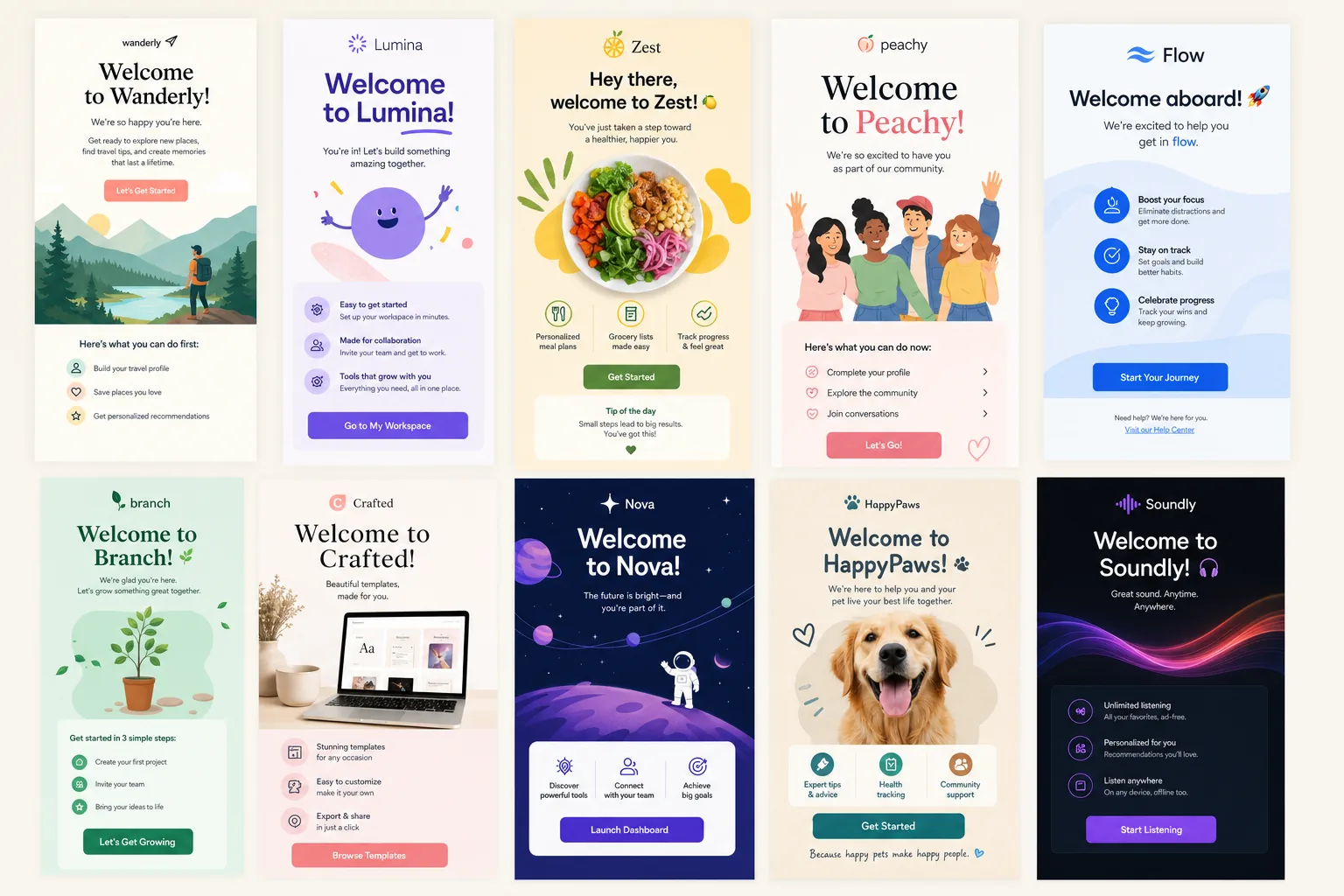
Strong onboarding starts before a customer has formed a real opinion about your product, store, or brand. That is why studying practical welcome email examples is useful for lifecycle marketers: the first email is not just a polite hello, it is the first structured moment where you set expectations, direct attention, and encourage meaningful action.
For CRM teams, email designers, and lifecycle marketers, the welcome message has to do several jobs at once. It needs to confirm the signup or account action, make the recipient feel oriented, explain what happens next, and create a clear path toward activation, purchase, or engagement. It also has to work on mobile, survive inbox scanning, and remain accessible to people reading with assistive technology or images turned off.
See also: email newsletter frequency
The examples below are grouped by use case rather than by brand category alone. That makes them easier to adapt into your own template library. Some are single-message welcomes designed to confirm and direct. Others are the first step in a multi-email onboarding flow. The goal is not to copy any one email exactly, but to identify patterns in structure, copy, CTA hierarchy, and design that your team can reuse.
Why welcome emails deserve a dedicated onboarding strategy
A welcome email is often treated as a triggered courtesy message: someone signs up, the system sends a thank-you, and the workflow ends. That approach leaves value on the table. In a well-planned lifecycle program, the welcome email is the first onboarding touchpoint and should be designed with the same level of intent as a product launch, cart recovery sequence, or renewal campaign.
The first decision is the purpose of the welcome. A SaaS signup may need to complete setup, invite a teammate, install a snippet, import data, or use one key feature. An ecommerce subscriber may need to redeem a first-purchase incentive, explore a category, learn the brand story, or set preferences. A publisher may want readers to choose topics, whitelist the sender, or understand newsletter cadence.
Those different goals lead to different email structures. A single welcome email works when the next action is simple and the relationship does not require much education. A multi-step onboarding flow is better when the user needs to progress through a sequence: confirm the account, complete setup, understand value, try a core feature, and develop a habit. The mistake is forcing one email to do every job.
Practitioner teams should optimize welcome emails around four outcomes:
- Expectation setting: Tell recipients what they will receive, how often, and why it matters.
- Brand orientation: Make the sender recognizable through voice, visual style, and clear positioning.
- Next-step clarity: Give one obvious action rather than a menu of competing options.
- Early engagement: Encourage a click, setup action, preference selection, or product discovery moment that signals interest.
For email designers, this also means building welcome templates that can scale. A good template should support modular sections, responsive behavior, accessible copy hierarchy, and easy personalization without breaking the layout.
15 welcome email examples, grouped by use case and format
The best welcome email examples are not impressive because they are visually elaborate. They work because the message architecture matches the recipient’s immediate intent. Use the following examples as practical patterns to compare and adapt.
1. The simple confirmation welcome
This email confirms that the signup worked and reassures the recipient they are in the right place. The structure is usually short: welcome headline, one sentence of context, and a clear CTA. It works well for newsletter subscriptions, account creation, and low-friction communities.
What to borrow: Keep the copy direct, place the CTA high, and avoid adding every possible resource. The recipient’s first need is confirmation, not a full brand archive.
2. The founder-note welcome
A founder or team note creates a human introduction. The copy typically explains why the company exists, what the subscriber can expect, and how to get started. This format is especially useful for brands where trust, mission, or expertise influences conversion.
What to borrow: Use a plainspoken tone, include a real point of view, and make the CTA feel like a natural next step rather than a hard sell.
3. The product activation welcome
For SaaS, the best welcome may be less about saying hello and more about getting the user to value. This example centers on one activation action, such as creating a first project, connecting an integration, uploading a file, or inviting a teammate.
What to borrow: Tie the CTA to progress. Instead of “Visit dashboard,” use action-oriented copy such as “Create your first workflow” or “Connect your first data source.”
4. The checklist welcome
A checklist welcome breaks onboarding into three to five visible steps. It is effective when users need guidance but the process should feel manageable. Each item should represent a meaningful milestone, not a random tour of features.
What to borrow: Prioritize steps by time-to-value. If step one is not essential, remove it or move it to a later email.
5. The educational welcome
This email introduces a concept before asking for deeper engagement. It may explain how the product category works, what problem the service solves, or which best practices the user should know before starting.
What to borrow: Lead with one useful insight, then connect that insight to the next action. Avoid turning the welcome into a long tutorial.
6. The preference-center welcome
This pattern asks subscribers to choose interests, frequency, location, product categories, or content topics. It is valuable for segmentation and relevance, especially when the signup source does not reveal intent.
What to borrow: Explain the benefit of sharing preferences. “Tell us what you like” is weaker than “Choose your topics so we can send fewer, better emails.”
7. The incentive delivery welcome
Common in ecommerce, this email delivers the promised discount, free shipping code, or first-order incentive. The risk is making the email only about the offer. Strong versions reinforce brand value while making the incentive easy to use.
What to borrow: Put the code or offer terms near the top, then guide shoppers to a focused destination such as best sellers, new arrivals, or a starter collection.
8. The product discovery welcome
This ecommerce welcome helps subscribers find the right products quickly. It may show categories, popular items, quiz entry points, or use cases. The design often uses image tiles, but the underlying strategy is navigation.
What to borrow: Limit choices. Three curated paths are easier to act on than twelve category blocks.
9. The brand story welcome
A brand story email explains origin, values, materials, process, or community. It is most useful when differentiation is not obvious from the product alone. The CTA can still be commercial, but the main job is to create affinity.
What to borrow: Connect the story to a practical reason to believe. Values are stronger when paired with proof points, product details, or customer outcomes.
10. The social proof welcome
This format uses reviews, customer quotes, press mentions, community size, or user-generated content to reduce hesitation. It can work for both SaaS and ecommerce when new subscribers need reassurance before taking the next step.
What to borrow: Use social proof that supports the CTA. If the goal is first purchase, highlight product satisfaction. If the goal is setup, show how quickly similar users got started.
11. The trial-start welcome
A trial-start email should clarify the trial length, what is included, and what the user should do first. The strongest versions avoid vague enthusiasm and instead create a path to the first success moment.
What to borrow: Include time context. For example, “Your 14-day trial starts today” creates urgency without exaggeration.
For more context, according to Nielsen Norman Group offers additional background on this topic.
12. The community welcome
This email invites the recipient into a group, forum, event series, or customer community. It works when peer learning, support, or identity is part of the product experience.
See also: black friday email template
What to borrow: Tell subscribers what they can do inside the community, not just that the community exists.
13. The content-led welcome
For newsletters, media brands, and education-driven SaaS companies, the welcome email can point to a small set of best resources. The key is curation. A recipient who just subscribed should not receive an overwhelming content library.
What to borrow: Choose three resources based on the signup promise and label them by outcome, such as “Start here,” “Improve your setup,” or “See examples.”
14. The rebrand or migration welcome
When users are joining because of a product migration, rebrand, or acquisition, the welcome needs extra clarity. It should answer what changed, what stayed the same, and what action is required.
What to borrow: Use plain language and reduce anxiety. Avoid clever copy when people need operational clarity.
15. The multi-email onboarding opener
This first email introduces a sequence rather than trying to complete onboarding in one send. It previews what the recipient will learn over the next few days and asks for one first action.
What to borrow: Set expectations for the series. If subscribers know helpful guidance is coming, later onboarding emails feel less random.
SaaS vs ecommerce welcome emails: what changes, what stays the same
SaaS and ecommerce welcomes often share the same channel mechanics, but the user intent is different. A SaaS recipient is usually trying to evaluate, configure, learn, or prove value. An ecommerce recipient is usually deciding whether to browse, trust, and buy. That difference should shape copy, CTA language, layout, and sequencing.
In SaaS, the welcome email should reduce time-to-value. That means the primary CTA should point to an action that helps the user experience the product, not simply read about it. Good SaaS welcome emails often include setup steps, contextual tips, product screenshots, short explainer copy, and links to documentation or support. However, the most important design rule is restraint: one primary action should dominate.
For ecommerce, the welcome email should reinforce the decision to subscribe and move the shopper toward discovery or purchase. If an incentive was promised, deliver it immediately and make the redemption path obvious. If no incentive exists, the email can lead with best sellers, brand differentiation, fit guidance, or a quiz that helps shoppers find relevant products.
What stays the same across both categories is the need for hierarchy. The recipient should understand the message in a few seconds: who it is from, why they received it, what they get, and what to do next. Whether the CTA says “Start your setup” or “Shop best sellers,” the email should not ask the reader to solve the layout.
Leave room here for an authoritative citation on onboarding, subject line performance, email engagement, or deliverability best practices.
Lifecycle teams should also think beyond the first send. In SaaS, the welcome email may trigger branches based on activation behavior. In ecommerce, it may trigger branches based on purchase, browse behavior, preference selection, or offer use. The welcome is not an isolated campaign; it is the opening move in a measurable lifecycle path.
Subject line patterns that increase opens without overpromising
Subject lines for welcome emails should be clear before they are clever. The recipient recently took an action, so recognition and continuity matter. Overly mysterious subject lines can create friction because they make the email feel disconnected from the signup moment.
Here are reliable subject line patterns to test:
- Direct welcome: “Welcome to [Brand]” or “You’re in — welcome to [Brand].” This works when clarity and confirmation matter most.
- Next-step framing: “Here’s what to do next” or “Start with these three steps.” This is useful for onboarding flows and SaaS activation.
- Incentive-led: “Your 10% off code is inside” or “Your first-order offer is ready.” Use this when the signup promise was an offer.
- Expectation-setting: “What to expect from us” or “A quick guide to getting started.” This helps newsletter, community, and education-led programs.
- Brand voice cue: A distinctive phrase can work when the brand is already expressive, but the meaning should still be obvious.
The preheader should extend the subject line rather than repeat it. If the subject is “Welcome to [Brand],” the preheader can say “Start with your account setup, recommended resources, and one quick next step.” If the subject is offer-led, the preheader can clarify the offer terms or destination.
Avoid promising more than the email delivers. “Everything you need to know” may sound useful, but it also signals length and effort. “Start here” is often stronger because it feels manageable. For ecommerce, avoid burying terms that affect trust. If an offer excludes certain products or expires quickly, make that clear in the email body.
Design and accessibility lessons from the best examples
Great welcome email design is not only about visual polish. It is about helping the recipient understand and act quickly across devices, inboxes, and accessibility contexts. For JQRD’s audience of email designers and CRM teams, this is where strategy becomes execution.
Start with visual hierarchy. The hero area should answer the main question: “Why am I receiving this and what should I do?” A concise headline, short supporting copy, and primary CTA should appear before the layout becomes dense. If the email requires scrolling, the top section still needs to carry the message.
CTA placement matters. In a simple welcome, one primary CTA near the top may be enough. In a longer educational email, repeating the same primary CTA after supporting content can help without creating competing decisions. Avoid stacking multiple equal-weight buttons such as “Shop now,” “Read our story,” “Follow us,” and “Take the quiz” in the same visual area.
Mobile responsiveness should be assumed from the start, not fixed after approval. Multi-column product grids, checklist modules, and category tiles need to collapse cleanly. Button text should remain readable, tap targets should be comfortable, and the most important content should not depend on tiny text embedded in images.
Accessibility is also a performance issue. Use live text for essential messages, write useful alt text for meaningful images, and maintain sufficient color contrast for text and buttons. If the welcome relies on a discount code shown only in an image, some subscribers may miss the offer entirely. If the CTA color has low contrast, the design may look on-brand but fail in practice.
Common welcome email design mistakes include burying the primary action below too much brand copy, using a large image with little live text, overloading the email with social icons and secondary links, and writing long paragraphs that are difficult to scan on mobile. A welcome email should feel like a guided first step, not a homepage squeezed into an inbox.
How to turn these examples into a reusable onboarding template
Use these welcome email examples as a template library for your next onboarding flow, then adapt the copy, layout, and subject line patterns to match your audience, product, and lifecycle stage. The most useful template is not a fixed design; it is a decision framework your team can apply across campaigns.
Start by choosing the welcome goal. Is the primary objective confirmation, activation, first purchase, preference collection, education, or community engagement? If the team cannot agree on the goal, the email will likely become cluttered.
Next, map the first action. Write one sentence that completes this thought: “After reading this email, the recipient should…” That action should determine the CTA, supporting copy, and content order. If the action is “complete setup,” do not lead with a brand manifesto. If the action is “redeem the offer,” do not hide the code under lifestyle imagery.
Then write the subject line and preheader as a pair. The subject should create recognition and interest. The preheader should add context, urgency, or specificity. Together, they should accurately preview the email.
Build the layout around one primary CTA. Secondary content can exist, but it should support the main action rather than compete with it. For example, a SaaS welcome can include a help link, but the primary button should still direct users to the activation step. An ecommerce welcome can include brand story, but the main path should lead to the most relevant shopping destination.
Before launch, use a lightweight QA checklist:
- Goal: Is there one clear objective for the email?
- Subject and preheader: Do they match the signup context and avoid overpromising?
- CTA: Is the primary action obvious within the first screen on mobile?
- Copy: Can the email be understood quickly by a first-time recipient?
- Design: Does the hierarchy guide attention instead of creating equal-weight sections?
- Accessibility: Are essential messages live text, with useful alt text and adequate contrast?
- Responsiveness: Does the design hold up in narrow mobile layouts?
- Measurement: Are clicks, activation events, purchases, or preference updates trackable?
Finally, plan the second email before you finalize the first. A welcome email becomes more effective when it fits into a sequence. If the recipient clicks but does not activate, what happens next? If they purchase immediately, should they continue receiving the same welcome series? If they ignore the first email, should the next message repeat the CTA or offer a different entry point?
The best onboarding programs treat welcome emails as living assets. Review engagement, click distribution, activation data, and customer feedback. Then refine the template: shorten copy, reposition the CTA, adjust the subject line, simplify the design, or split one overloaded email into a sequence. That is how a welcome message becomes more than a greeting; it becomes a structured path into the customer relationship.
Leave a Reply