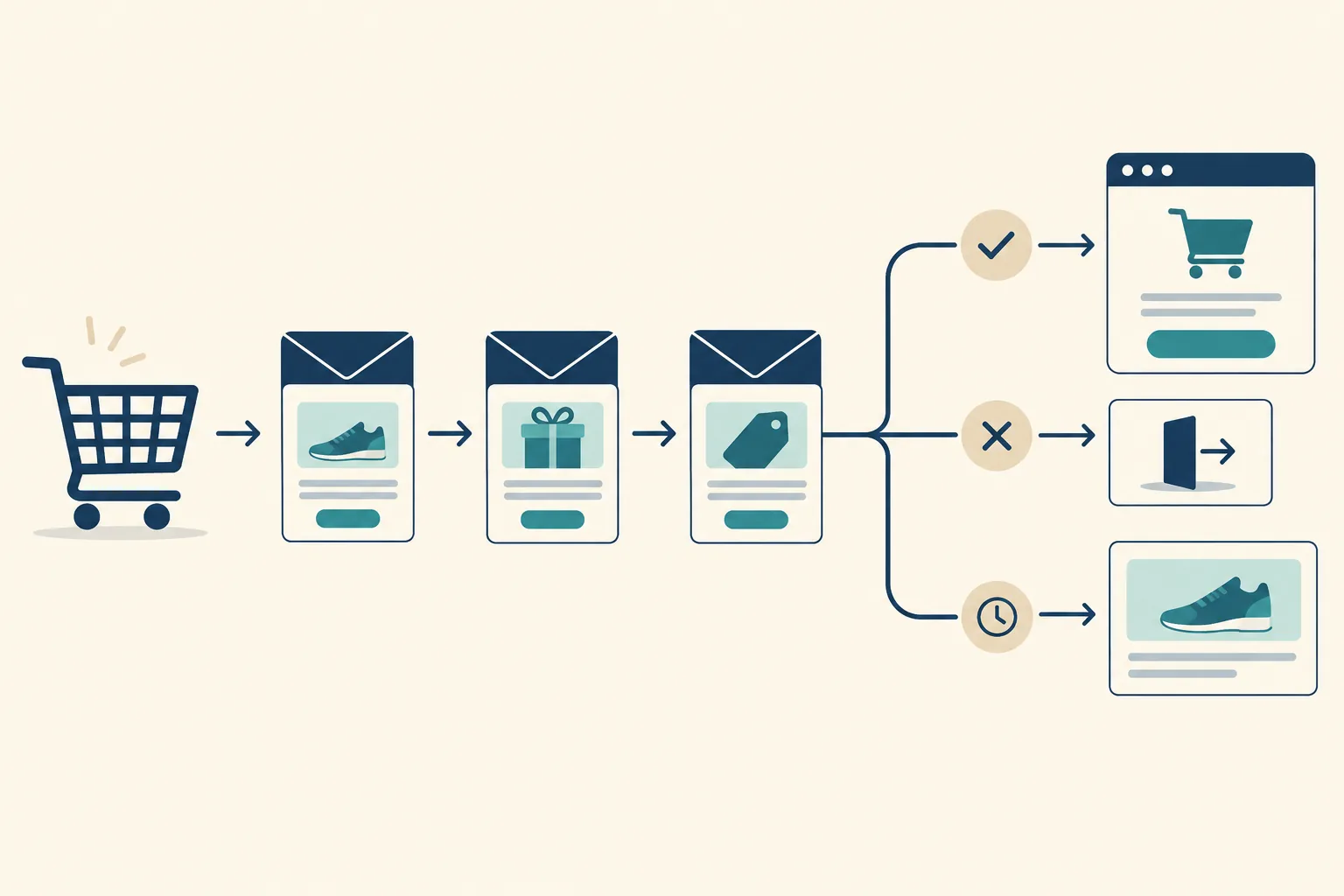
An abandoned cart email works best when it continues a shopping journey rather than simply asking for a sale. The shopper already showed interest; your job is to restore context, resolve a plausible concern, and make returning easy. That requires more than persuasive copy. Reliable events, accurate product data, sensible timing, accessible email design, and clear measurement all influence whether the experience helps.
For lifecycle marketers and email designers, the practical challenge is building a recovery program that stays useful as carts, inventory, and customer preferences change. Use this guide to plan the flow, define its safeguards, and test whether it generates additional purchases—not just purchases that happen after an email.
See also: email subject lines
What cart abandonment means—and what email can realistically recover
Cart abandonment occurs when someone adds a product to a cart but does not complete a purchase within your defined observation window. Checkout abandonment is narrower: the shopper starts checkout but does not finish. Browsing abandonment happens earlier, when someone views products without adding them to a cart. Keep these audiences separate because their intent and the data available to you differ.
Shoppers leave for many reasons. Shipping charges or taxes may appear late. An account requirement may interrupt checkout. They may be comparing options, waiting for payday, checking a size, or encountering a payment error. Some carts are simply temporary shopping lists.
Email can remind a distracted shopper, clarify a return policy, or offer help. It cannot repair a broken payment form, eliminate unexpected charges, or guarantee that someone still wants the item. Review checkout errors, support questions, and shipping-cost visibility alongside your email program. Otherwise, the flow may repeatedly direct shoppers back to the same obstacle.
Sending also requires an identifiable, eligible recipient. An email address entered during checkout is not automatically permission for every marketing message. Determine the applicable consent or other legal requirements for each market, record the relevant permission evidence, and honor opt-outs. Do not assume that a cart reminder qualifies as a transactional message simply because it references a shopping session.
Start with event data and reliable suppression
Build a small event specification before writing the sequence. Your marketing platform needs to know who acted, which cart changed, what it contains, and whether a purchase has since occurred. A visually polished template cannot compensate for an outdated cart or a missed order event.
Define the minimum data contract
- Identity: a stable customer or contact identifier, deliverable email address, and current sending eligibility.
- Cart activity: cart or checkout identifier, event type, event timestamp, and last meaningful update.
- Products: product and variant identifiers, names, quantities, images, and destination URLs.
- Commercial context: currency, item prices, and any available inventory or offer eligibility information.
- Purchase completion: order identifier, customer identity, completion timestamp, and cart association where available.
Define entry around inactivity, not simply an add-to-cart event. For example, a shopper might become eligible after a configurable period without another cart update or purchase. Repeated events should update the existing journey rather than create several parallel sequences. Use a stable cart or checkout identifier for deduplication and document how guest identities merge with logged-in profiles.
Check suppression both when a shopper enters and immediately before each send. A customer who purchased during a waiting step should exit. If order-to-cart matching is unreliable, a temporary suppression after any purchase may be safer than risking an irrelevant reminder; review the trade-off for your catalog.
Remove unavailable or canceled items from the recap where supported. Stop a message if the cart becomes empty, all items become ineligible, or the recipient unsubscribes, complains, or becomes undeliverable. Where only part of the cart changes, refresh the content rather than presenting a stale snapshot.
Validate the integration before launch
- Measure the delay between a storefront action and its appearance in the messaging platform.
- Confirm that purchase events arrive quickly enough to prevent post-purchase reminders.
- Test duplicate events, delayed events, multiple devices, and guest-to-account transitions.
- Open product and cart-restoration destinations on mobile and desktop, including an expired session.
- Check variant, quantity, currency, and price formatting across supported markets.
- Verify that restoration URLs do not expose personal information and have appropriate access protections.
Plan timing, message roles, and decision points
A two- or three-message sequence is a useful starting structure, not a universal optimum. Choose timing based on shopping behavior, product consideration time, event latency, and your existing promotional calendar.
Example sequence: test a first reminder two hours after the last cart activity, a second message about 24 hours later, and an optional final message two days after that. These intervals are starting hypotheses. A high-consideration purchase may need more space, while a short-lived shopping need may make a long sequence irrelevant.
- Message one: restore context. Show the cart, provide a clear return action, and offer a simple route to help. Avoid assuming why the shopper left.
- Message two: reduce uncertainty. Explain a relevant policy, sizing resource, delivery condition, or supported payment option. Choose information that addresses actual customer questions.
- Message three: close the loop. Send a final useful reminder only if the shopper remains eligible. An incentive can be tested here, but it is not a required component.
Apply frequency caps across lifecycle and promotional campaigns, not just within this flow. If someone is also receiving a welcome series or a sale campaign, establish message priority and defer or suppress lower-priority sends. Coordinate with SMS and push programs so the same cart does not trigger simultaneous reminders on every channel.
Use quiet hours where appropriate and rely on a trustworthy recipient time zone. Define a fallback when location is unknown. If a send is deferred, check purchase status, cart validity, and offer expiry again at the new send time.
Document branching rules explicitly. A purchase should end the journey. A substantial cart change may refresh the journey or restart its inactivity timer, subject to re-entry limits. A click without a purchase can justify different support content, but it should not automatically trigger more messages. Avoid branching on opens alone: privacy features and automated image loading make them an unreliable signal of intent.
Build an abandoned cart email with one clear next step
The core job of an abandoned cart email is to help the recipient recognize the shopping context and return without unnecessary effort. Use a recognizable sender name, a straightforward subject line, and preview text that adds useful information rather than repeating the subject.
Example subject: “Want to pick up where you left off?” Example preview text: “Review your items or get help before checking out.” These examples do not imply that products are reserved or that a discount exists.
Further reading: Forbes.
Place the primary action near the cart recap. “Return to your cart” is usually clearer than a vague label such as “Discover more.” Multiple instances of the same primary action can help in a long email, but avoid competing destinations that turn a recovery message into a general product newsletter.
See also: outlook email rendering
- Cart recap: show accurate product names, variants, quantities, and useful images.
- Current details: display price and availability only when the data is sufficiently fresh. Otherwise, invite shoppers to review current details in their cart.
- Support information: include concise, accurate information about shipping, returns, or assistance when it helps the decision.
- Trustworthy claims: never imply that inventory is low, a cart is reserved, or an offer is expiring unless that claim can be verified.
Design for real email conditions
Use a responsive layout that preserves a logical reading order on narrow screens. Keep key copy and calls to action as live text rather than embedding them in images. Give meaningful product images descriptive alt text, and keep decorative image descriptions empty where the email implementation supports it.
Check text and button contrast, readable type sizes, and comfortable touch targets. Make link text understandable out of context, and ensure keyboard users can identify and activate links. Do not use color alone to communicate a discount or availability change.
Test with images blocked, enlarged text, dark mode, and representative email clients. Supply a readable plain-text alternative with the essential message and return destination. Finally, test the full journey: an accessible email still fails if its primary action opens an empty cart or an unusable mobile checkout.
Personalize and incentivize without weakening trust or margin
Useful personalization begins with the shopper’s actual cart. Correct variants, relevant policy information, and the right currency are more valuable than a first-name greeting. Known language preferences or customer status can help when the underlying data is reliable and appropriate to use.
Plan fallbacks for every dynamic element. If a first name is missing, omit the greeting rather than exposing a template token. If an image is unavailable, preserve the product name and action. If the cart cannot be reconstructed accurately, suppress the product-specific message or use a tested, neutral reminder only when the shopping context remains valid.
Avoid language that feels like surveillance. “You looked at this five times” adds little practical value and may unsettle the recipient. Explain what the shopper can do next instead of narrating their behavior.
Before offering a discount, address friction that does not require one: a confusing returns policy, unanswered sizing questions, unclear delivery conditions, or difficulty finding support. Mention only payment methods and service options actually available for that shopper’s market and cart.
If you test an incentive, define the commercial rules before launch:
- Specify eligible customers, products, markets, and minimum order values.
- Exclude products or combinations that cannot support the cost.
- Set clear expiry terms, including time zone where relevant, and enforce them consistently.
- Decide whether codes can stack and how repeated flow entry affects eligibility.
- Evaluate contribution after discounts and relevant variable costs, not just gross order revenue.
Offering every abandoner a coupon can encourage shoppers to delay buying. Compare an incentive treatment with a no-incentive alternative, and consider whether a useful reassurance message achieves a similar business outcome without the margin cost.
Measure recovery, troubleshoot failures, and test deliberately
Separate operational diagnostics from business outcomes. Delivery and clicks help explain whether the program is functioning; they do not establish that the flow caused additional purchases.
- Eligible entrants: unique shoppers or carts meeting your documented entry rules.
- Delivery: accepted messages, bounces, and delivery trends. Acceptance does not guarantee inbox placement.
- Clicks: unique recipients clicking the primary action, with automated activity filtered where possible.
- Recovered orders: qualifying purchases within a defined attribution window after flow exposure.
- Revenue per recipient: attributed revenue divided by a clearly stated recipient population, applied consistently.
- Negative signals: unsubscribes, complaints, and repeated delivery failures.
Document the attribution window and rules for overlapping campaigns. Some shoppers will return without a reminder, so attributed revenue should not be described as incremental revenue. Where feasible, randomly assign eligible shoppers to a no-flow holdout and compare purchase rates and revenue over the same observation period. Keep assignment stable at the shopper level to reduce contamination from repeat carts.
Before testing copy, confirm the flow is technically healthy. Review sender authentication, including SPF, DKIM, and DMARC configuration; unsubscribe handling; suppression updates; and complaint feedback where available. Investigate sudden changes by mailbox provider, device, and event source rather than treating every decline as a creative problem.
Build a controlled testing backlog
Prioritize tests by the uncertainty they resolve. Start with first-message timing, then consider subject lines, CTA wording, reassurance content, and incentive eligibility. Change one meaningful variable at a time when traffic permits. Define the primary outcome, guardrail metrics, allocation, and evaluation period before launch, and avoid declaring a winner from an early fluctuation.
If clicks are healthy but orders are weak, inspect cart restoration, mobile checkout, unexpected costs, and payment errors. If purchased items still appear in reminders, check event latency, identity matching, and pre-send suppression. If engagement suddenly falls, investigate deliverability and tracking changes before rewriting the entire sequence.
Launch-and-review checklist
- Confirm eligibility rules, permission records, and unsubscribe handling.
- Validate event timing, identity matching, deduplication, and purchase exits.
- Test cart destinations, dynamic-content fallbacks, prices, and currency.
- Review responsive rendering, accessibility, and the plain-text alternative.
- Apply frequency caps, quiet hours, and cross-channel priorities.
- Verify incentive restrictions and remove unsupported urgency claims.
- Define attribution, reporting denominators, and a holdout where feasible.
- Schedule an early operational review and a later performance review after the observation window closes.
Use this checklist to audit your current abandoned cart email flow. Then prioritize one data-quality fix and one controlled message test before expanding the sequence. A reliable, relevant recovery journey is a stronger foundation than adding more reminders to an uncertain system.
See also: birthday email examples
Leave a Reply